
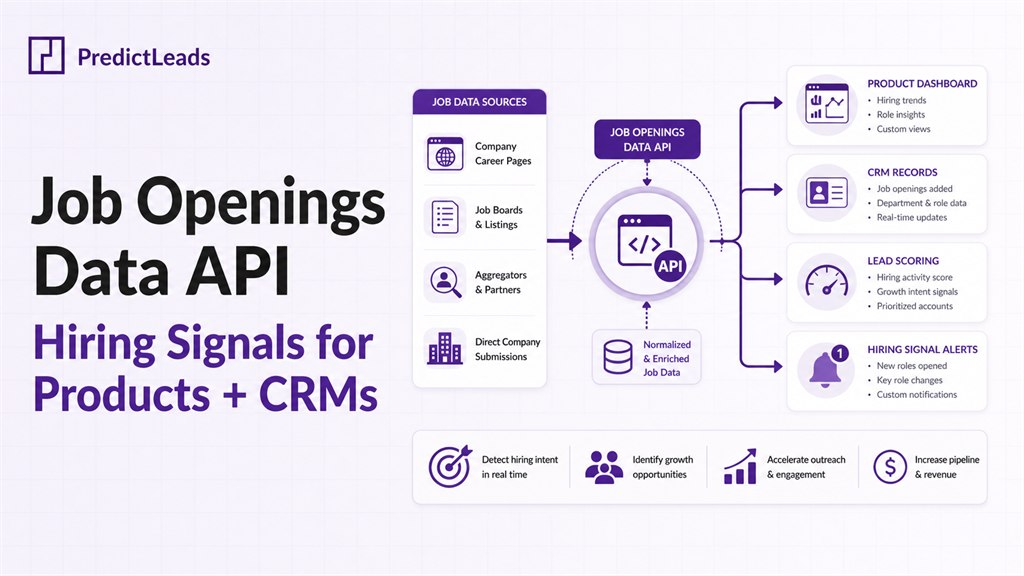
A job openings data API helps teams add hiring signals directly into products, CRMs, enrichment workflows, lead scoring models, and account monitoring systems. Instead of manually checking career pages, teams can use structured job data to understand which companies are hiring and what that hiring activity means.
Hiring activity often reveals company movement. A company hiring sales reps may be expanding revenue capacity while companies hiring data engineers may be investing in analytics or AI. A company hiring in a new country may be entering a new market.
This guide explains how a job openings data API works and how teams can use hiring signals in real GTM and product workflows. For the broader dataset overview, see the PredictLeads Job Openings Dataset page.
TLDR:
- A job openings data API gives you structured hiring signals you can query by domain, title, and location without building your own scraper.
- Enrich CRM accounts in six steps: define target roles, query by domain, deduplicate, map fields, set a sync cadence, and trigger alerts.
- Deduplication matters: one reposted role can appear on four sources and inflate your account’s hiring score if you skip it.
- Job description
tagsfields can indicate tool usage or planned adoption, but treat them as supporting evidence, not confirmation. - PredictLeads provides Job Openings data with normalized titles,
first_seen_attimestamps, and webhooks, with records going back to 2018.
What Is a Job Openings Data API?
A job openings data API provides structured access to job postings data. It lets teams query, filter, and ingest job data without building their own scraping pipeline.
Useful job openings data usually includes:
- company name and domain
- job title
- job description
- location
- posting date
- source URL
- detected keywords or technologies
- historical or current status
PredictLeads provides job postings data through its jobs dataset and related company intelligence datasets.
A Practical Workflow to Enrich Your CRM With Role-Level Hiring Signals
You can add role-level hiring signals to Salesforce or HubSpot in six steps. The example below assumes a team that sells sales tooling and wants to know which accounts are building out their sales org.
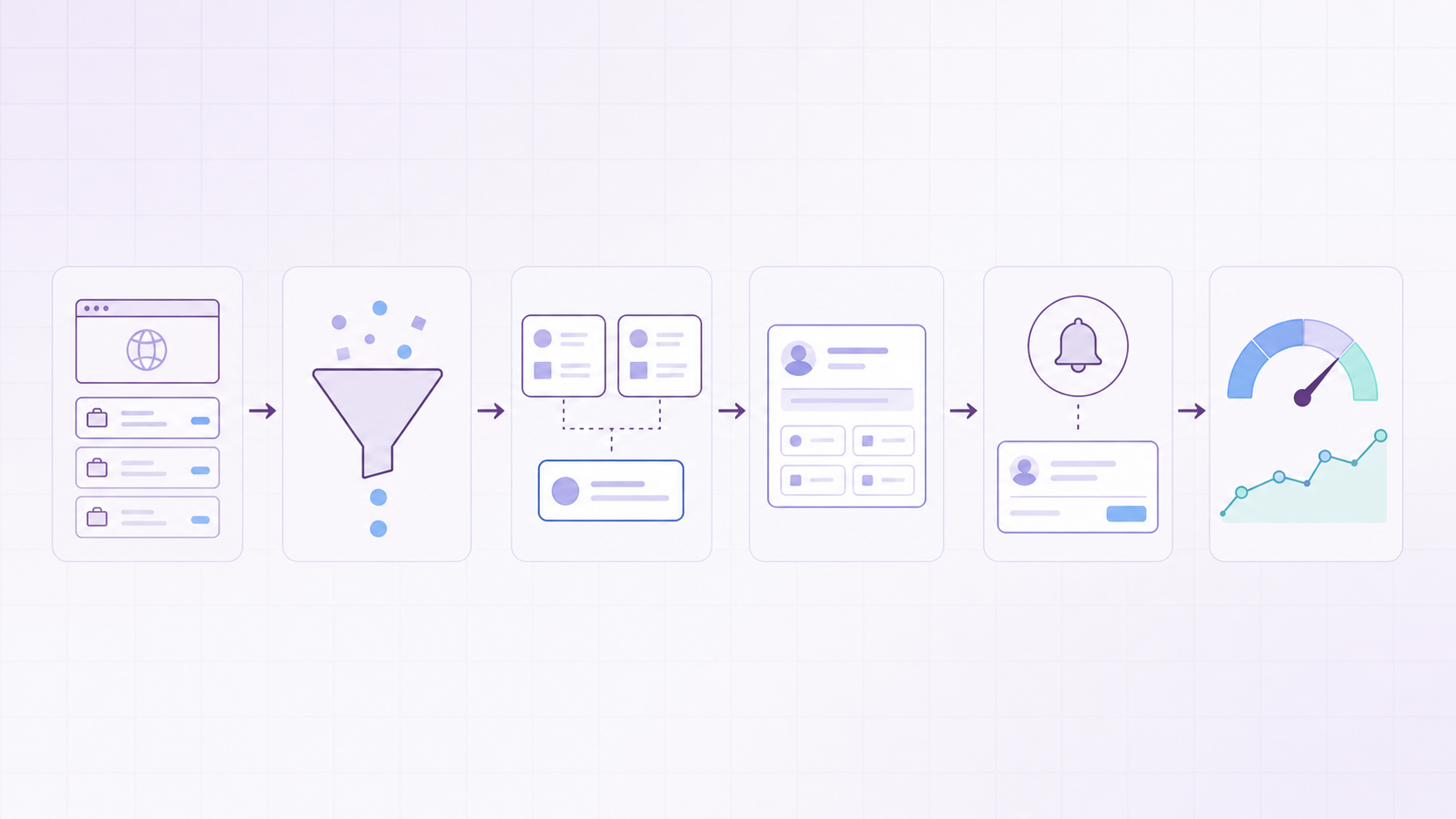
- Define the roles and departments that matter to your ICP. Pick the job categories that signal a need for your product, such as
sales,software_development, orfinance, and add seniority levels if they matter. A sales tooling vendor might track SDR, account executive, and sales operations openings, while a data infrastructure vendor might track data engineering roles. - Query the job openings API by company domain, title keywords, and location. Use the domain from each CRM account as the lookup key and call
GET /companies/{company_id_or_domain}/job_openingswith filters such asactive_only,location, andcategories. Then match your title keywords againstnormalized_title, and request up to 1,000 results per page to keep credit usage low. - Deduplicate and remove closed or stale listings. Drop any record with a
statusof closed, check thatlast_seen_atis recent, and collapse listings that share the samenormalized_titleand location. This keeps one reposted role from counting as three. - Map matched fields to CRM fields on the account record. Match on company domain, then write the job title, posting date, and detected keywords (the
tagsfield) to custom properties, for example “Open Sales Roles,” “Latest Role Posted,” and “Hiring Keywords.” If you want the full detail, store each opening as a custom object linked to the account, so reps can see individual roles without cluttering the account layout. - Set a sync cadence. Job openings are refreshed approximately every 36 hours, so a daily sync catches new listings for most workflows. Use a weekly sync for large, lower-priority account lists, and pull only new listings with
first_seen_at_fromto avoid reprocessing old records. - Trigger alerts or scoring updates on new role-level activity. Build a Salesforce Flow or HubSpot workflow that fires when a tracked account gains new openings in your target roles. For example, add points to the account score and create a task for the owner when an account posts three or more sales openings in a week.
In practice, map categories, normalized_title, and status to an open role count, first_seen_at to the latest role date, seniority to role seniority, and tags to hiring keywords. Treat tool mentions in tags as supporting evidence of use or interest, not confirmation of an active installation. Use last_seen_at to drop stale or closed roles from open role counts on every sync, so reps can filter for accounts with five or more open Sales roles and sort by the most recent posting.
If you want pushed updates instead of scheduled pulls, follow your key accounts and receive webhooks from the JobOpeningsDataset when a job opening is found or closed. The PredictLeads documentation covers the endpoint filters and webhook setup in detail.
Why Use an API Instead of Manual Collection?
Manual collection does not scale. Career pages change, job boards duplicate listings, and raw scraped data often needs heavy cleaning before it becomes useful.
A job openings data API helps teams skip much of that work. It gives them structured data that can feed internal tools, workflows, and applications.
The table below compares the two approaches across the five areas where teams feel the difference most, with an example of how each one plays out on a real account list.
Area | Manual Collection | API-Based Collection |
|---|---|---|
Speed and refresh | Con: time-consuming. Someone has to open each career page, look for new roles, and copy the details into a spreadsheet. Checking 200 accounts once a week means 200 page visits before any analysis starts, and a role posted on Tuesday may not be noticed until the next check. | Pro: faster refresh. Job openings are refreshed approximately every 36 hours. You can pull only new listings with |
Data consistency | Con: inconsistent data. One company writes “Sr. AE,” another writes “Account Executive II,” and a third writes “Sales Executive (Enterprise).” Dates, locations, and seniority appear in different formats, so every record needs hand cleanup before you can compare accounts. | Pro: structured fields. Every record follows one schema, including |
Duplicates | Con: duplicate listings. One SDR role can appear on the career page, two job boards, and a recruiter site. Counted by hand, it looks like four openings, which inflates the account’s hiring score and sends reps after a push that does not exist. | Pro: deduplication. Listings are deduplicated and titles are normalized, so the same role counts once. The |
Usable fields | Con: no structured fields. A copied job description is a block of free text. To find out which department is hiring or whether a role is senior, someone has to read it, and the answer never lands in a CRM field a rep can filter on. | Pro: easier CRM integration. Match on company domain, then write open role counts, hiring department, role seniority, and latest posting date to custom properties in Salesforce or HubSpot. Reps can build a list view of accounts with five or more open Sales roles in one filter. |
Scale | Con: hard to scale across accounts. A manual process can work for 20 target accounts. At 500, career pages change layouts, links break, and the person doing the checks becomes the bottleneck. | Pro: scalable across thousands of accounts. The same domain-based call works for one account or thousands, and you can request up to 1,000 results per page to keep credit usage low. Adding accounts means adding domains to your sync, not adding headcount. |
Manual checks still make sense for a short list of strategic accounts where a rep wants to read the careers page personally. Once the list grows beyond what one person can review each week, structured API data is the more reliable base for CRM enrichment, lead scoring, and alerts.
- Product teams can add hiring signals to customer-facing features.
- Sales teams can enrich CRM accounts with hiring activity.
- Marketing teams can build segments around growth intent.
- Data teams can use hiring signals in scoring models.
For provider comparison, read Best Job Data Providers in 2026.
Common Use Cases for a Job Openings Data API
CRM enrichment
Teams can add hiring activity to company records in Salesforce, HubSpot, or internal CRMs. This helps reps see which accounts are growing, which departments are hiring, and which accounts may deserve priority.
Before enrichment, an account record might hold only the company name, domain, industry, and employee count. After enrichment, the same record gains four fields: Open Roles (30 days) set to 14, Hiring Department set to Sales, Role Seniority set to Manager, and Last Hiring Activity Date set to the most recent first_seen_at value. These values map to the categories, seniority, and first_seen_at fields in the job openings data. Reps can then filter a Salesforce list view or HubSpot saved view to accounts with five or more open roles in Sales, or sort by Last Hiring Activity Date to reach out while the hiring push is still recent.
Lead scoring
Hiring signals can improve lead scoring by adding timing and intent. A company hiring three or more SDR roles in a month may score higher than one with no new postings.
See Hiring Signals for B2B Sales for a practical scoring workflow.
Market intelligence products
Data platforms can use job openings data to show labor demand, workforce changes, company expansion, and sector-level trends. This is useful for market intelligence, investment research, and competitive analysis.
For example, a platform can group Job Openings by categories and company location, then count new openings per month using first_seen_at. If marketing and sales openings across a vertical fall for several months in a row while engineering openings hold steady, that pattern can indicate slowing demand in that vertical. A comparison against the same quarter a year earlier helps separate a real slowdown from seasonal hiring. An analyst can then check the accounts behind the drop and review their News Events for context such as layoffs or office closures.
PredictLeads covers this angle in how hiring signals reveal company growth.
Technology detection and stack intelligence
Job descriptions often mention tools and platforms. That makes job openings data useful for detecting technologies that may not be visible from a website alone.
For example, a Data Engineer opening that lists Snowflake in its tags field gives you evidence that the company uses or is considering Snowflake, even if no website script or DNS record shows it. If the same account also posts several openings that mention Snowflake while older postings listed a different warehouse, that pattern can indicate a possible migration. Treat a single mention as supporting evidence of use or interest, not confirmation of an active installation, and look for a cluster of postings before you act on it.
For more detail, read Job Openings Data and Technographics.
What to Look for in a Job Openings Data API
Not all job data is equally useful. Teams should look for data quality, coverage, freshness, and reliable company matching.
The source of a hiring signal also affects how much weight it deserves. A role published on a company’s own career page tells you something different from the same role copied across five job boards. Match each signal source to the workflow it supports, then use the quality criteria in the list that follows to test any provider.
Hiring Signal Strength by Source
Signal Source | Example | Relative Strength | Best Use Case |
|---|---|---|---|
Direct job board posting (e.g., Indeed, company career page) | A “Senior Account Executive” opening on a company’s career page or Indeed listing, with a source URL and a | Strong | CRM enrichment and lead scoring. The employer published the role itself, so you can write the title, posting date, and category to the account record and trust that the opening is real. |
Aggregated/duplicated listings | The same “Data Engineer” role copied across three job boards and a recruiter site, each with slightly different titles. | Weak | Requires deduplication before use. Without it, one reposted role can count as three or four openings and inflate hiring scores. Collapse records by |
Historical job posting trends | Sales openings at one account rising from three to 12 across two quarters, or a sector-wide drop in marketing roles over a year. | Medium | Market intelligence and growth tracking. A trend line shows direction and pace, but it needs context (seasonal hiring, backfills, acquisitions) before you treat it as proof of expansion. |
Role-specific keyword-tagged postings | A “Revenue Operations Manager” opening whose | Strong | Account prioritization for specific team buyers. A sales tooling vendor can rank accounts that are building a sales org, while a data infrastructure vendor can rank accounts hiring data engineers. A tool mention in a job description is supporting evidence of use or interest, not confirmation of an active installation. |
- Company matching: jobs should connect to the correct company domain.
- Deduplication: duplicate listings should not inflate hiring activity.
- Freshness: new jobs should appear quickly enough for timely workflows. As an illustrative target, new postings should ideally appear within 24 to 48 hours of going live. At that pace, a rep can reach out while a hiring push is still recent, and a daily CRM sync picks up new roles within a day or two. To test a provider, pick 20 roles you watched go live on career pages and compare each posting date with the provider’s
first_seen_atvalue. A gap of a week or more means alerts may arrive after other sellers have already reached out. Also checklast_seen_atto confirm that closed roles drop out of your open role counts. For reference, PredictLeads refreshes job openings approximately every 36 hours, and webhooks push a notification when a job opening is found or closed for a followed company. - Structured fields: teams need fields they can filter and score.
- Historical coverage: historical data helps teams understand trends, with more than snapshots to work from. As an illustrative benchmark, 12+ months of historical job posting data helps identify hiring trends instead of one-time spikes. For example, an account that posts 10 sales roles in a single month may look like it is expanding, but a full year of history shows whether that is seasonal hiring, a round of backfills, or a long-running build-out. Twelve months also lets you compare the same quarter year over year and measure how long roles stay open before they close. Check that each record keeps
first_seen_atandlast_seen_attimestamps, since those two fields let you rebuild open role counts for any past date. PredictLeads holds historical job openings records since 2018, which supports multi-year trend lines for market intelligence and growth tracking.
FAQ
What fields does the PredictLeads job openings API return for each posting?
Each job opening record includes the job title, normalized title, full description, location, posting date, source URL, O*NET occupation code, salary data, seniority level, contract type, job category, and a tags field containing keywords detected in the description. The first_seen_at and last_seen_at timestamps let you filter for new listings and remove stale ones without reprocessing your full account list.
How does PredictLeads job openings data differ from LinkedIn or a job board scrape?
PredictLeads sources postings directly from company career pages and ATS integrations, deduplicates listings, normalizes titles, and classifies every role with an O*NET code, so the data arrives structured and ready to filter. LinkedIn is a strong place to browse individual postings and see who is hiring, but it is built for people reading listings, not for pipelines. A raw job board scrape can include duplicate listings and inconsistent titles, so you may need to add deduplication, title normalization, and an occupation taxonomy before the data works in a scoring or enrichment pipeline.
Can I use the PredictLeads job openings API to detect which technologies a company is planning to adopt?
Yes, with appropriate framing. Job descriptions frequently list tools and platforms as required skills, and PredictLeads captures these in the tags field and via its Technology Detections dataset. A cluster of postings mentioning a specific tool can indicate planned adoption or an active migration, though a job description mention is supporting evidence of likely use or interest, not confirmation of an active installation.
How do I receive real-time hiring alerts for a list of tracked accounts using PredictLeads?
Follow your target accounts via POST /companies/{company_id_or_domain}/follow, then configure a webhook endpoint to receive JobOpeningsDataset events. PredictLeads pushes a notification each time a new job opening is found or closed for a followed company, so your CRM or alerting system can react without waiting for a scheduled API pull.
How often should hiring signal data sync to my CRM?
Job openings are refreshed approximately every 36 hours, so a daily sync catches new listings for most workflows. Use a daily sync for named accounts and open deals, and a weekly sync for large, lower-priority lists. Pull only new records with first_seen_at_from so each run processes just what changed since the last one, and switch to webhooks if reps need an alert as soon as a role appears.
Which job roles matter most for B2B sales prioritization?
The roles that matter are the ones tied to your buyer’s need. A sales tooling vendor can track SDR, account executive, and sales operations openings, while a data infrastructure vendor can track data engineering roles. Filter by categories and seniority, and give extra weight to a manager or director opening in your buyer’s department or to three or more openings in the same team within a week, since both can indicate a team being built out.
How do I avoid duplicate or stale job postings in my CRM?
Drop any record with a status of closed, check that last_seen_at is recent, and collapse listings that share the same normalized_title, location, and company domain. For example, one SDR role posted on a career page and three job boards should count as one opening, not four. Run this cleanup on every sync so roles that disappear stop inflating the account’s open role count.
Can hiring signals be combined with other intent data?
Yes, and the combination is usually stronger than any single signal. A hiring push tells you the direction of an account, while a second signal adds timing: a recent Financing Events record suggests fresh budget, a News Events record such as expands_offices_to pairs well with openings in that location, and Technology Detections show evidence of which tools the account uses. Treat each signal as supporting evidence and score them together instead of relying on one.
How fresh is job openings data typically?
PredictLeads refreshes job openings approximately every 36 hours, and high-traffic websites can be crawled multiple times daily. Every record carries first_seen_at and last_seen_at timestamps, so you can see when a listing first appeared and when it was last observed. For push-based freshness, webhooks deliver a notification when a job opening is found or closed for a followed company.
What’s a good way to enrich a CRM with firmographic and technographic data via API?
Use the company domain as the lookup key, then make one call per data type and write the results to custom CRM properties. Call GET /companies/{id_or_domain} for firmographic fields such as description, structured location, NAICS codes, revenue range, employee range, and parent company. Call GET /companies/{company_id_or_domain}/technology_detections for Technology Detections, which provide evidence of which technologies a company uses or has recently used. Store first_seen_at and last_seen_at next to each technology so reps can tell a recent detection from an older one. Then add Job Openings fields for timing. Enrich calls cost 1 credit per page of up to 1,000 records, so request full pages to keep credit usage low.
What are good data sources for account-based marketing (ABM) signals?
Most ABM programs combine several signal types instead of relying on one. From PredictLeads, you can pull Job Openings (which departments are hiring), Technology Detections (evidence of tools in use), News Events (leadership changes, partnerships, expansions), Financing Events (fresh budget), and Connections (shared vendors and partners). Deliver them through the API, flat files, webhooks, or MCP. First-party signals such as website engagement and product usage come from your own CRM and analytics, and third-party intent data from content networks or review sites is a separate category. Score the signals together, since each one is supporting evidence of fit or timing, not proof of a buying decision.
How can I detect when a company opens a new office location?
No single signal confirms a new office, so combine three. First, query News Events for the opens_new_location, expands_offices_to, expands_offices_in, and expands_facilities categories using GET /companies/{company_id_or_domain}/news_events with the categories filter. Second, check Job Openings location_data for a cluster of new openings in a city where the account had no prior listings. Third, watch Website Evolution for a new locations or contact subpage. Follow key accounts and receive NewsEventsDataset and JobOpeningsDataset webhooks so you see changes as they are detected. PredictLeads does not provide foot-traffic or street-level business location data, so treat these signals as evidence of expansion and confirm before outreach.
Final Thoughts
A job openings data API turns hiring activity into account intelligence when you follow the same sequence every time: define the target roles that match your ICP, query the API by company domain, deduplicate and remove closed listings, map the matched fields into your CRM, and monitor ongoing hiring activity with scheduled syncs or webhooks.
Each step protects the next one. Clear role definitions keep your queries narrow, deduplication keeps open role counts accurate, and field mapping puts the result where reps already work. For example, when an account posts three sales openings in a week, its score rises and the account owner gets a task, without anyone opening a career page.
PredictLeads provides structured Job Openings data with normalized titles, O*NET codes, and first_seen_at and last_seen_at timestamps, plus related signals such as Financing Events and News Events. You can run this workflow through the API, webhooks, or MCP, and start with your most important accounts before you scale to the full list.
Ready to see this in your own data?
Start with $20 in free credits when you create an account – no credit card, no sales call.
Pingback: B2B Job Openings Data Guide October 2026 | PredictLeads
Pingback: 6 B2B Lead Enrichment Tools | PredictLeads
Pingback: Best CRM Data Enrichment APIs September 2026 | PredictLeads
Pingback: Supply Chain Intelligence Tools Ranked | PredictLeads
Pingback: Find Expired Jobs, October 2026