
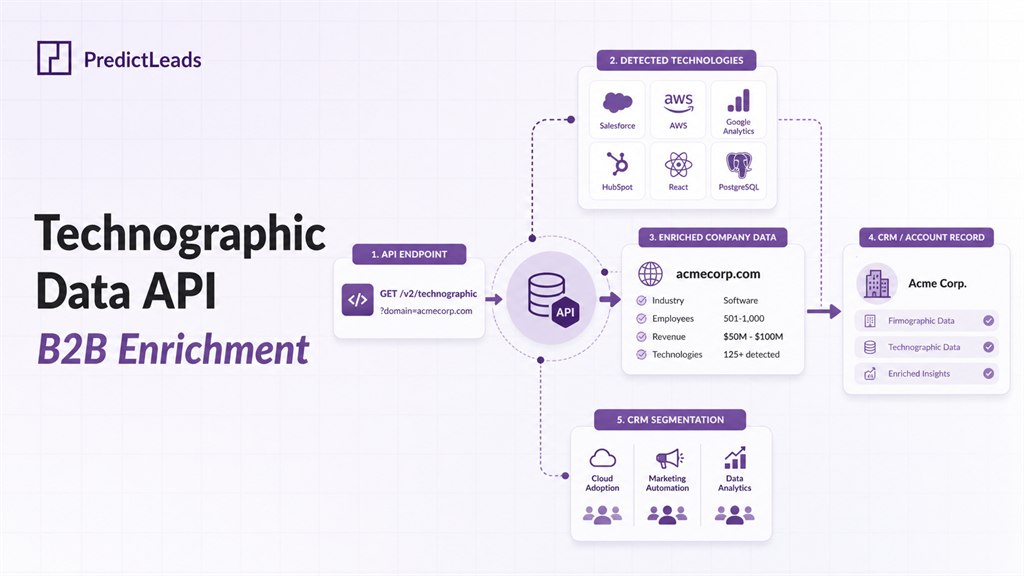
GTM engineers typically use a technographic data API combined with company and firmographic data sources to enrich accounts and power GTM workflows. A technographic data API helps B2B teams enrich company records with the technologies companies use. Instead of manually checking websites or researching tools one account at a time, teams can use an API to detect technology stacks, update account profiles, build segments, score leads, and trigger GTM workflows. Firmographic data (industry, company size, location, revenue range) shows which accounts fit your ideal customer profile (ICP), and technographic data shows which of those accounts use tools that make your product a fit. GTM engineers are usually the people who build these workflows: they own the data pipelines, enrichment workflows, and scoring systems that connect a technographic data API to CRMs, outbound tools, and AI agents.
This technical guide supports our comparison of the best technographic data providers in 2026. Use that article to compare providers, and use this guide to understand how technographic data APIs fit into real workflows. For the main concept page, start with What Is Technographic Data?. For broader enrichment strategy, see B2B Data Enrichment with Company Signals.
TLDR:
- A technographic data API returns structured technology records per company domain, with
first_seen_atandlast_seen_atdate fields you can use for scoring and routing. - Detection methods cover different parts of the stack: web scraping finds front-end tools, DNS analysis finds infrastructure, and job postings point to back-end systems.
- Use
first_seen_atandlast_seen_atto run competitive displacement plays and install-base targeting workflows directly from your CRM. - Scoring gets more accurate when you pair technology detections with hiring signals and firmographic filters like company size and NAICS code.
- PredictLeads provides Technology Detections with source and date fields via API, flat files, webhooks, and a Clay integration for no-code enrichment.
What Is a Technographic Data API?
A technographic data API returns structured information about the technologies associated with a company. Depending on the provider, this can include software tools, analytics platforms, ecommerce systems, cloud infrastructure, developer frameworks, marketing technologies, security tools, data warehouses, and other technology signals.
The API usually accepts a company domain, company identifier, or other lookup input. It then returns technology records that teams can store in a CRM, warehouse, enrichment system, sales intelligence platform, or internal application.
In practice, GTM engineers pair two layers of data on the same company record. The firmographic layer (domain, company name, industry, size, location, and NAICS code) defines the target market. The technographic layer adds the technologies detected for each company, with first_seen_at and last_seen_at dates that show how recent each detection is. Joining the two on the company domain lets you run a query such as “US companies with 201 to 1,000 employees that show evidence of using Snowflake” and write the result to the CRM as filterable fields.
How Technographic Data Is Detected
Every technographic record is evidence of technology use, and the detection method behind it decides how far you can trust it. Providers collect signals from several public sources, and each source sees a different part of a company’s stack.
Detection Method | What It Detects | Strengths | Limitations |
|---|---|---|---|
Web scraping and tag analysis | Marketing tools, analytics, CMS, chat widgets (for example, Google Analytics, HubSpot tracking code, Intercom) | Strong coverage of front-end technology, with the source page visible for verification | Misses back-end systems that never load in a browser, such as data warehouses or internal CRMs |
DNS and MX record analysis | Email providers, CDN, hosting, and security tools (for example, Google Workspace, Cloudflare) | Reliable for infrastructure, because records are public and change only when the setup changes | Limited to technologies that leave a DNS footprint |
Job posting analysis | Internal tools and developer stack signals from required skills (for example, Snowflake, dbt, Salesforce) | Good for back-end and internal tools that no website reveals | Delayed and inferential: a mention can point to current use, planned adoption, or a hiring requirement |
Cookies and IP ranges | Cloud hosting and services that set cookies or sit in known IP ranges | Adds evidence when no script tag is present | Shared IP ranges and generic cookies can produce ambiguous matches |
Consider one account. A script tag shows a HubSpot tracking code, an MX record points to Google Workspace, and job postings list Snowflake and dbt as required skills. No single method would have found all three.
For GTM engineers, this is why the detection method matters when you choose or combine a technographic data API. Check which sources sit behind each record and whether it carries first seen and last seen dates. Treat a job posting mention as supporting evidence, not confirmation of an active installation. Also remember that a missing detection has several possible causes, including script changes and recrawl gaps, so it does not prove a company dropped a tool.
Common Technographic Data API Inputs and Outputs
A typical request sends one lookup input, such as a company domain, and the response returns a list of technology records for that company. Each record carries the technology name, its category, the detection source, and the first seen and last seen dates, plus company metadata you can join to firmographic fields in your CRM or warehouse.
| API layer | Example | Why it matters |
|---|---|---|
| Lookup input | Company domain or company ID | Connects the request to the right company |
| Technology name | Salesforce, HubSpot, Snowflake, AWS | Shows which tools appear in the company stack |
| Technology category | CRM, cloud, analytics, ecommerce, security | Makes segmentation and scoring easier |
| Detection source | Website signal, job posting, DNS, public content | Helps teams understand confidence and context |
| First seen / last seen | Date fields | Shows when the technology appeared or changed |
| Company metadata | Name, domain, industry, location | Connects technographic data to firmographics |
Why Technographic Data APIs Matter for B2B Teams
Technographic data becomes much more useful when teams can access it programmatically. A static spreadsheet can support one campaign, but an API can power ongoing account enrichment, routing, scoring, alerts, and AI-assisted research.
In practice, a GTM engineer writes a script or uses a tool like Clay (for example, its Search Company Technologies module) to pull technology detections for each domain, normalizes them into CRM-friendly fields such as category, first seen date, and last seen date, and triggers scoring or routing logic when a relevant technology appears. They also decide which detections count as strong evidence (a website script tag carries different weight than a job posting mention) and schedule refreshes so account records stay current.
- GTM engineers can turn detections into reusable workflows, such as a Clay table or scheduled script that writes technology fields to the CRM and fires an alert when a competing technology is first detected on a target account.
- Sales teams can focus first on companies using complementary or competing technologies.
- Marketing teams can build segments based on stack fit and technology adoption.
- RevOps teams can enrich CRM records and improve lead routing.
- Data teams can add technology signals to warehouses, scoring models, and internal products.
- AI teams can give agents fresher context about company tools, stack changes, and account fit, for example through the PredictLeads Model Context Protocol (MCP) integration.
Example Workflow: Account Enrichment
A common workflow starts with a list of company domains from a CRM, product signup flow, data warehouse, or target account list. The system sends each domain to a technographic data API, receives technology records, and writes selected fields back into the account profile.
The workflow runs in five steps: collect company domains into a target account list, call the technographic data API to get technology detections, normalize categories into CRM-friendly fields, score account fit to set a higher or lower priority, and route the account or trigger a workflow such as a sales task, campaign, alert, or dashboard update.
Example Workflow: Lead Scoring
Technographic data can improve lead scoring when the presence or absence of specific tools changes account fit. For example, a company selling Snowflake consulting services may score accounts higher when they use Snowflake, Databricks, BigQuery, Fivetran, dbt, or other modern data stack technologies.
The score becomes stronger when technographic data connects to other company signals. A company using a relevant technology and hiring data engineers may deserve a higher score than a company with the technology signal alone. A company that also raised funding or launched a new data product may deserve an even higher score.
Two more use cases build on the same scoring logic: competitive displacement and install-base targeting. Both start from the technology records your pipeline already stores, and both depend on the date fields (first_seen_at and last_seen_at) that come with each detection.
Use Case: Competitive Displacement
Competitive displacement means reaching out to accounts where a rival’s tool has recently appeared in the stack or is no longer detected. A technographic data API makes these changes visible, because each detection shows when a technology was first seen and when it was last seen. Either change can point to an active buying or switching decision, so both deserve a high score in your model.
- A competitor newly appears. A recent
first_seen_atfor a rival tool can indicate an account that has just adopted it. The account may be early in its contract term, though timing varies by vendor, so you can plan a head-to-head comparison and time outreach around the eventual renewal window. - A competitor is no longer detected. A rival tool with an older
last_seen_atand no recent detections can indicate that the account is replacing it. Treat this as a lead, not a conclusion. A missing detection has several possible causes, including script changes, recrawl gaps, and signature changes, so confirm it with a second source before you write that the company left the tool.
Example: A customer support software vendor competes with a well-known help desk tool. The GTM engineer sets a rule that adds points when the help desk tool is no longer detected on a target account that previously showed it. The rule adds more points when the same account has new job openings for support operations roles that mention a different help desk tool. Job posting mentions are stronger supporting evidence of a possible transition, but they do not confirm one. The account moves to the top of the SDR queue with the detection dates attached, so the first message can reference a change the buyer is likely living through.
Use Case: Install-Base Targeting
Install-base targeting means building account lists from companies that show evidence of using a technology your product works with. If your product integrates with a CRM, a data warehouse, or an analytics tool, accounts that already use that tool have a shorter path to value. They already hold the data your product needs, and the integration reduces setup work. That fit can indicate a higher-intent prospect than a cold account matched on firmographics alone.
A practical workflow has three steps:
- Pull every company with a detection for the complementary technology, filtered by company size, location, or NAICS code to match your ICP.
- Add points for supporting signals, such as a second complementary tool, a recent
first_seen_at, or open roles that name the technology as a required skill. - Write the technology and its detection source to the CRM, so reps can open with the integration instead of a generic pitch.
Example: A revenue analytics vendor offers a native Salesforce integration. Its GTM engineer pulls US companies in the 201 to 500 and 501 to 1,000 employee size ranges that show evidence of using Salesforce. Accounts that also show a data warehouse such as Snowflake score higher, because they are more likely to need a reporting layer on top of both systems. Accounts with open RevOps or sales operations roles score higher again. The outreach message then names the integration and the connected tools, which gives the buyer a concrete reason to reply.
For both use cases, keep the rules explainable. A rep who can see why an account scored high, such as “competitor no longer detected, new support operations hiring” or “Salesforce detected, size fit”, is more likely to act on the score.
Related reading: job openings data and technographic accuracy and job postings data and buying intent.
How PredictLeads Fits
PredictLeads technology data helps teams connect technographic signals with broader company intelligence. That broader context matters because technology adoption often becomes more actionable when paired with hiring activity, news events, financing events, product launches, and other business changes.
For technical teams, PredictLeads can support enrichment pipelines, internal data products, GTM scoring models, market intelligence systems, and AI workflows that need structured company signals instead of manual research.
Common Ways GTM Teams Access Technographic Data
GTM teams usually reach technographic data through one of four routes. The right one depends on who runs the workflow, how often records need to refresh, and how much control the team wants over detection logic.
Each route fits a different working style. Here is how they tend to play out in practice:
- Dedicated technographic data API. A GTM engineer calls the Technology Detections endpoints for each domain, stores
first_seen_at,last_seen_at, and the detection source, and refreshes records on a schedule. This route fits teams that want scoring rules built on detection dates and evidence types. You can also pull bulk history through flat files or receive new detections for followed companies through webhooks. - No-code enrichment tools. A RevOps analyst builds a Clay table, adds a column that searches company technologies for each domain, and filters the results to a target category. The PredictLeads connection in Clay includes modules such as Search Company Technologies and Search Companies Using Technology, so you can run this without writing code.
- Built-in CRM enrichment features. A sales ops team turns on the enrichment options inside its CRM and gets technology fields on new records automatically. Field coverage, detection sources, and date history vary by CRM and plan, so check what each record exposes before you build scoring rules on it.
- Custom-built scraping and detection pipelines. A data team writes crawlers that look for specific script tags, DNS records, or job description keywords. This gives full control over the signatures, but the team owns crawling, recrawl schedules, signature maintenance, and false positive review.
These routes are not mutually exclusive. Many teams pair an API with a no-code tool: the API supplies detections with source and date fields, a Clay table handles ad hoc enrichment and list building, and a scheduled job writes the final fields to the CRM. A custom pipeline can then cover a niche technology that no provider tracks.
Best Practices for Using Technographic Data APIs
- Start with a clear use case before choosing fields or providers.
- Map technologies into categories that sales and marketing teams understand.
- Track recency, including when a technology first appeared and when it was last detected.
- Combine technographic data with hiring, company news, and firmographic signals.
- Keep scoring rules explainable so GTM teams trust the output.
- Review false positives and stale technologies regularly.
FAQ
What is a technographic data API?
A technographic data API gives teams programmatic access to structured information about the technologies companies use, such as CRM systems, analytics tools, cloud platforms, ecommerce software, and developer frameworks.
How do GTM teams use technographic data APIs?
GTM teams use technographic data APIs for account enrichment, segmentation, sales prospecting, lead scoring, routing, alerts, and personalized outreach.
Why combine technographic data with job postings or company news?
Combining signals adds context. Technology Detections provide evidence of which tools a company uses or has recently used, while job postings and company news can show whether the company is growing, investing, launching products, or changing strategy.
How do technographic data APIs detect which technologies a company uses?
Technographic data APIs combine several public detection methods. Web scraping and tag analysis finds front-end tools such as analytics, CMS, and chat widgets, DNS and MX record analysis finds email, CDN, and hosting providers, and job posting analysis points to back-end tools listed as required skills. Each method covers a different part of the stack, so combining them gives fuller records, and job posting mentions work best as supporting evidence instead of confirmation of use.
What is a technographic displacement signal?
A technographic displacement signal appears when a competitor’s tool newly shows up in a target account’s tech stack or is no longer detected there. Either change can point to an active buying or switching decision, so the account deserves prompt sales follow-up. Confirm a missing detection with a second source first, because script changes and recrawl gaps can also cause it.
What is a good way to enrich a CRM with firmographic and technographic data via API?
Use the company domain as the join key and enrich each record in two API calls. First, request firmographics for the domain (industry, NAICS code, location, employee range, and revenue range). Then request technology records for the same domain, including each technology’s category, first_seen_at, last_seen_at, and detection source. With PredictLeads, these map to the company and Technology Detections endpoints. Write the results to custom CRM fields through the CRM’s own API, and keep the detection dates so scoring rules can tell a recent adoption from an old one. Refresh records on a schedule, or follow key accounts and receive new detections through webhooks. If you work without code, a Clay table with the PredictLeads connection runs the same two lookups.
What are the best data sources for account-based marketing (ABM) signals?
No single source covers every ABM signal, so most teams combine first-party data with third-party company signals. First-party sources include CRM history, product usage, and website engagement. Third-party company signals include Technology Detections (stack fit and competitor adoption), Job Openings (hiring in the department you sell to), Financing Events (fresh budget), and News Events (expansions, partnerships, and leadership changes). Similar Companies adds lookalike accounts when you want to widen your target list. PredictLeads supplies these company-level signals through API, flat files, webhooks, and MCP. It does not measure which topics an individual buyer reads about, so teams that need content-consumption intent data pair it with a separate intent provider.
Ready to see this in your own data?
Start with $20 in free credits when you create an account – no credit card, no sales call.
Pingback: 6 B2B Lead Enrichment Tools | PredictLeads
Pingback: Technographics Dataset: Tech Stack Leaders | October 2026
Pingback: SimilarTech Alternatives | PredictLeads