
Lookalike companies are one of the best starting points for building a high-quality target account list. If your best customers share similar business models, hiring patterns, technology stacks, funding stages, or growth signals, you can use those patterns to find more companies that are likely to be a strong fit. The goal is to spot which lookalike companies show real signs of being ready to buy right now, using hiring patterns as one of the clearest available signals. Open roles in the right departments show what a company plans to build next, which is often where a buying need starts.
But similarity alone is not enough. The best prospecting lists combine lookalike companies with timing signals, especially active hiring and recent funding. That combination helps you find accounts that look like your best customers and are also showing signs of growth, budget, and change.
This guide explains how to find lookalike companies, filter them by hiring activity and funding events, and turn them into a practical list for outbound, account-based marketing (ABM), partnerships, or CRM enrichment.
TLDR:
- Lookalike companies built from your best customers give you a stronger ICP starting point than generic firmographic filters.
- A single job posting can mean backfill or restructuring; a cluster of related roles across departments is a real growth signal.
- Companies in the 6 to 12 month window after a funding round are often when budgets get allocated and vendor reviews peak.
- Score accounts into three tiers: similarity plus hiring plus funding (Tier 1), one signal present (Tier 2), fit only (Tier 3).
- PredictLeads provides Job Openings, Financing Events, Similar Companies, and News Events data to build and refresh this workflow.
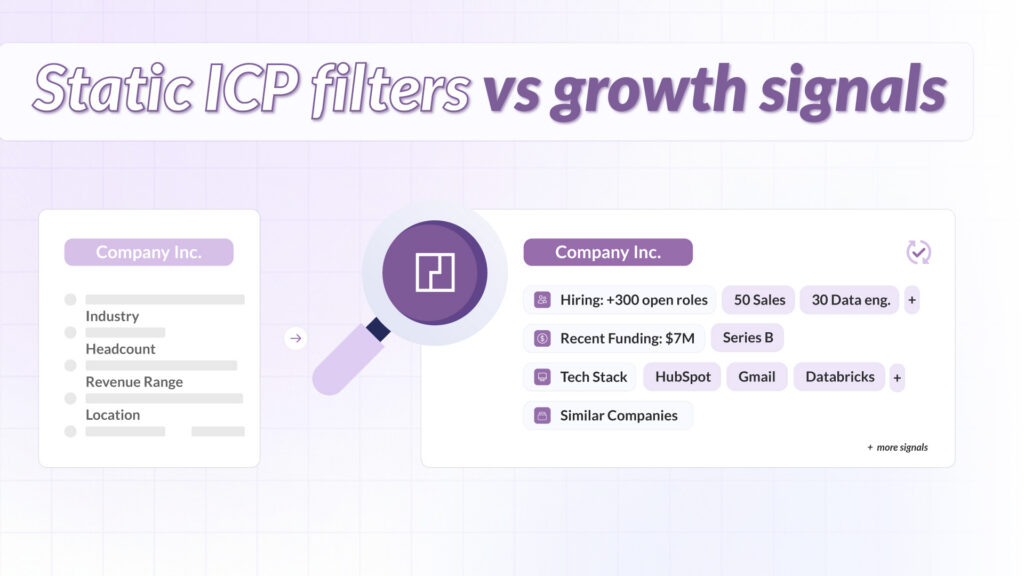
Static firmographics show fit on paper. Growth signals reveal which lookalike companies are actually moving.
What are lookalike companies?
Lookalike companies are businesses that resemble your best customers based on meaningful attributes. These can include industry, company size, business model, technology stack, hiring behavior, funding stage, geography, customer type, and growth pattern.
A basic lookalike list might use simple filters like industry and headcount. A stronger list uses changing signals to identify companies that are similar, active, and likely to have a current need.
Signal | What it tells you | Why it matters |
|---|---|---|
Industry and business model | Basic fit | Helps match your ICP |
Technology stack | Tooling setup | Shows compatibility and workflow fit |
Hiring activity | Current priorities | Reveals teams that are growing or under pressure |
Recent funding | Budget and growth stage | Indicates capacity to invest |
Company news events | Strategic movement | Shows expansion, launches, partnerships, or leadership changes |
Why static ICP filters are not enough
Most go-to-market teams start with a sensible ICP: industry, company size, geography, revenue, and maybe a few technology filters. That is a useful baseline, but it does not tell you whether an account is ready to act.
Two companies can look identical in a database and still be in completely different situations:
- One company may be freezing hiring and cutting spend.
- Another may be hiring aggressively, expanding into new markets, and rolling out new systems.
If you only use static filters, both accounts may look equally good. When you add hiring, funding, and other growth signals, you can separate companies that merely fit your ICP from lookalike companies that are actually in motion.
Why hiring and funding improve lookalike company lists
Hiring and funding are useful because they indicate change. A company that is actively hiring has approved budget and day-to-day staffing needs. A company that recently raised funding often has more capacity to invest in people, tools, infrastructure, and growth.
Hiring shows company priorities
Job postings reveal what a company is building next. Sales hiring may point to go-to-market expansion. Data engineering roles may indicate infrastructure investment. Security and compliance roles may signal enterprise readiness.
Use these role-to-signal pairings as a starting point when you read Job Openings data for a lookalike company. Each pairing points to a product category that may fit, so treat it as a hypothesis to confirm with other signals:
- VP of Data, Head of Data, or Data Engineer: Often signals investment in data infrastructure or analytics tooling. Relevant for data warehouse, ETL, business intelligence, and data quality vendors.
- Multiple sales development representative (SDR) or business development representative (BDR) postings at once: Often signals go-to-market expansion and new outbound tooling needs. Relevant for sales engagement, data enrichment, and dialer vendors.
- Security Engineer, GRC Analyst, or Compliance Manager: Often signals enterprise readiness and procurement of security and compliance software. Relevant for SOC 2 readiness, vulnerability management, and identity access vendors.
- Salesforce Administrator, CRM Specialist, or RevOps Manager: Often signals CRM migration or tooling changes. Relevant for CRM integration, data cleanup, enrichment, and forecasting vendors.
- DevOps Engineer, Site Reliability Engineer, or Infrastructure Engineer: Often signals infrastructure scaling. Relevant for observability, CI/CD, incident management, and cloud cost tools.
- First People Operations or HR leadership hire: Often signals a scaling stage that requires new HR tech. Relevant for applicant tracking, HRIS, payroll, and onboarding vendors.
- First Head of Marketing or Demand Generation hire: Often signals a new marketing function that needs a stack. Relevant for marketing automation, web analytics, and ABM vendors.
- Customer Success Manager or Support Lead cluster: Often signals a growing customer base and retention pressure. Relevant for help desk, customer success, and in-app messaging vendors.
Match the role to the product you sell, then check seniority and whether the posting looks like a first hire for that function. In many cases, a first-time leadership hire carries more weight than another junior opening on a mature team, because new leaders often review the tools they inherit. Filter Job Openings by category and seniority to separate the two, and pair the pattern with funding or news signals before you reach out.
Hiring signals are evidence of activity, not confirmed buying intent
A job posting alone does not confirm budget or purchase intent. Be careful about over-interpreting a single listing, because the same posting can have several explanations that have nothing to do with a new buying need:
- Backfilling: A company replaces a departed account executive or data engineer. Headcount stays flat and no new initiative starts.
- Internal restructuring: A team reorganizes, and roles are reposted under new titles or in a different department. The postings are new, but the spend is not.
- Routine headcount maintenance: Companies with steady turnover keep evergreen listings open, so a posting can sit on a careers page for months without signaling growth.
The signal becomes meaningful when multiple relevant postings form a pattern across departments and time. One posting for a sales development representative says little. Several sales development, sales operations, and revenue operations roles opened over a few weeks, plus a customer success lead, point to a go-to-market build-out. In Job Openings, compare first_seen_at and last_seen_at to separate a fresh cluster of roles from stale evergreen listings, and check seniority and O*NET codes to see whether you are looking at a new function or the same title being refilled.
Hiring also gets stronger when you read it next to other signals. A lookalike company with a hiring cluster in a relevant department and a recent financing event has two independent reasons to expect new investment. A News Events record such as expands_offices_in or launches adds a third. Each extra signal lowers the chance that you are reading a backfill as growth. Treat hiring as a strong hint on its own and a much better filter when you combine it with funding and company news, which is how it improves targeting accuracy without claiming to confirm intent.
Funding shows budget and timing
Funding does not guarantee buying intent, but it often changes a company’s operating mode. After a raise, teams may accelerate hiring, enter new markets, upgrade tooling, or professionalize operations.
In go-to-market data, the first visible change is usually hiring. In many cases, companies begin opening new roles soon after closing a round, starting with the functions the money was raised to build, such as sales, engineering, or customer success. Tooling and vendor decisions tend to follow later. In many cases, the months after a round, often somewhere in the first year, can be when budgets get allocated and vendor reviews pick up, because new leaders have joined and start reviewing the systems they inherited. Treat this as a hypothesis and test the timing against your own closed-won deals.
Use these windows as starting points and test them against your own closed-won deals:
- 0 to 30 days after the round: The company is announcing the raise and setting priorities with its board and investors. Add the account to a watchlist and track it, but hold back heavy outreach.
- 30 to 90 days: The first hiring cluster often appears. Check Job Openings for a
first_seen_atdate after the financing date, and look at which departments are growing first. - 3 to 6 months: New hires start to settle in and form opinions about the current tools. This is a good window for outreach tied to the roles you saw posted.
- 6 to 12 months: Budgets are approved and vendor reviews are in many cases at their busiest. Accounts that match your lookalike profile and show continued hiring in this window are the strongest candidates.
Here is how this plays out in practice. Suppose two lookalike companies each raised a similar amount. Both appear in Financing Events with an effective_date in the same month and a financing_type_normalized of series_a. Eight weeks later, the first company has posted sales development, sales operations, and customer success roles. The second has posted nothing new. The first is a stronger candidate for outreach now, and the second can stay on the watchlist until its hiring starts. Comparing the financing date with the first_seen_at of new postings gives you a simple measure of how quickly a company is turning capital into action.
Read the round type and size alongside the timing. A seed company and a Series C company may both sit inside the same 12 month window, but they usually hire different roles and buy different tools (see this overview of the stages of venture capital). Rounds such as venture debt, grants, or bridge financing can also follow different spending patterns than an equity round, so filter by financing_type_normalized before you apply the same timing assumptions to every account.
Similarity plus timing creates better target accounts
Company similarity data finds the right type of company. Hiring and funding help identify the right moment. Together, they create a list that is more relevant than a generic ICP export and more actionable than a plain lookalike audience.
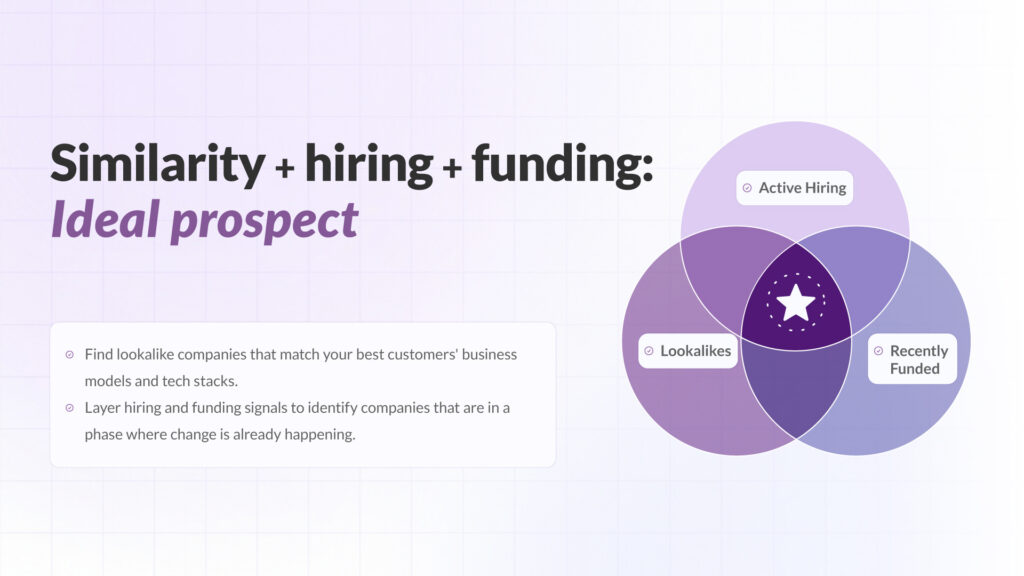
The best prospects sit at the intersection of lookalike companies, hiring momentum, and recent funding.
How to find lookalike companies step by step
This workflow helps you find lookalike companies and focus on the ones most likely to be worth sales or marketing attention.
1. Start with your best customers
Start with customers that represent success in practice, and look past logo size. Good seed accounts usually have strong retention, short ramp time, clear product value, and a repeatable use case.
- Which customers expanded after the first deal?
- Which accounts had the shortest sales cycle?
- Which customers adopted the product quickly?
- Which use cases are easiest to repeat?
2. Build a richer similarity model
Do not stop at industry and size. Strong lookalike companies usually match across several dimensions:
- Industry and sub-industry
- Business model
- Technology stack
- Hiring patterns
- Growth stage
- Customer type or market segment
3. Filter for active hiring
Reduce noise by filtering the list to companies with active job openings. Then go deeper by looking at department, role type, seniority, location, and hiring velocity.
A company hiring across relevant teams is usually more interesting than a company with one isolated job post. Hiring momentum helps show whether the account is actively changing.
For example, if you sell sales engagement software, a lookalike company with three open SDR roles and a new sales operations manager posting is a stronger candidate than one with a single marketing coordinator opening. In Job Openings, filter by category and seniority, and use the active_only parameter to remove closed listings before you count roles per account.
Related guide: Job postings data for buying intent.
4. Overlay recent funding events
Next, add recent financing events. A funding window of the last 6 to 12 months can help identify accounts with new budget, expansion pressure, or scaling plans.
Segment by funding round type so your outreach matches the company’s situation. A seed-stage company and a Series C company may both be recently funded, but they usually have different buying motions and day-to-day needs.
5. Check company news and growth events
Use news events to validate that the growth story is real. Look for market expansion, product launches, leadership hires, partnerships, acquisitions, or major customer announcements.
Related guide: PredictLeads News Event categories guide.
6. Score and tier the list
Do not send a giant undifferentiated list to sales. Score your lookalike companies so the team knows where to start.
A simple lead scoring model gives each component a score from 0 to 3, adds the points, and groups accounts into tiers. Tier 1 accounts match your seed customers closely and show both a relevant hiring cluster and a financing event in the last 12 months. Tier 2 accounts match well and show one of those signals. Tier 3 accounts match on fit alone and stay on a watchlist until a hiring or funding signal appears. Adjust the weights after you compare the tiers against your own closed-won deals.
| Score component | Example question |
|---|---|
| Similarity score | How closely does this company match your best customers? |
| Hiring momentum | Is the company actively hiring in relevant departments? |
| Funding recency | Has the company raised funding recently? |
| Tech fit | Does the company use compatible or relevant technologies? |
| Growth events | Are there recent expansion, launch, partnership, or leadership signals? |
7. Push the best accounts into your CRM
Once the list is scored, push the best accounts into your CRM or sales engagement workflow with the signals attached. Reps should know why an account is similar, why it is timely, and which trigger makes it worth contacting now.
Treat this workflow as a recurring weekly or biweekly process, not a one-time export. On each run, re-apply the hiring and funding filters, re-score accounts as new Job Openings, Financing Events, and News Events records appear, and refresh the list in your CRM. Flag any account that moves from Tier 2 to Tier 1 because of new activity, such as a lookalike that posts its first sales operations role a few weeks after closing a Series A. If you prefer to receive signals as they are detected, follow your target accounts and use webhooks for new job openings and news events instead of re-running searches by hand. With webhooks, you can reach an account soon after a hiring cluster appears, instead of waiting for a periodic search to surface it.
Example lookalike companies workflow
A practical workflow could look like this:
- Choose 20 best customers as seed accounts.
- Find similar companies based on industry, business model, technology stack, and growth patterns.
- Filter for accounts with active hiring in relevant departments.
- Focus on companies that raised funding in the last 6 to 12 months.
- Add news events, technology adoption, and connection signals.
- Score accounts into Tier 1, Tier 2, and Tier 3.
- Send the highest-priority accounts to sales with the reason for outreach.
Where PredictLeads fits in
PredictLeads helps teams find lookalike companies and rank them with real company signals. Instead of stitching together separate tools for similarity, hiring, funding, news, technologies, and connections, teams can use structured company data from PredictLeads inside their existing GTM workflows.
- Similar Companies: Find accounts that resemble your best customers.
- Job Openings: Identify companies with active hiring momentum.
- Financing Events: Track recently funded companies.
- News Events: Monitor launches, expansions, partnerships, and leadership changes.
- Technology Detections: Segment companies by tools and technology adoption.
- Connections: Find investors, partners, and warm-path relationships.
If you want to build a signal-based target account list, start with PredictLeads or review the PredictLeads API docs.
Real-time company signals help GTM teams find and rank better-fit accounts.
FAQ
What are lookalike companies?
Lookalike companies are businesses that resemble your best customers based on shared attributes such as industry, business model, technology stack, hiring patterns, funding stage, growth signals, or customer type.
How do you find lookalike companies?
You can find lookalike companies by starting with your best customers, identifying shared traits, generating a similarity list, and then filtering by signals such as active hiring, recent funding, technologies, and company news.
Why add hiring data to lookalike company lists?
Hiring data shows which companies are actively investing in teams and capabilities. It helps separate static lookalike companies from accounts that are currently growing or changing.
Why add funding data to lookalike company lists?
Recent funding can indicate new budget, expansion pressure, and a stronger likelihood that the company is investing in people, tools, infrastructure, or go-to-market growth.
Are lookalike companies useful for ABM?
Yes. Lookalike companies are useful for ABM because they help teams expand from proven customer patterns into new accounts that share similar traits and show timely buying signals.
What are the best data providers for identifying similar or lookalike companies?
No single provider is best for every team, so match the provider to the job. PredictLeads Similar Companies is the strongest fit when you want lookalikes built from several signals. It covers 18.9M+ companies, returns up to 50 lookalikes per company, gives each match a similarity score from 0 to 1, and adds a text reason for the top 20 matches. The matching draws on technologies, news, jobs, and other PredictLeads datasets, and you can pull Job Openings and Financing Events for the same accounts through the same API. Contact-first providers such as ZoomInfo and Apollo are strong when you need verified contacts and firmographic filters, so many teams pair a company data provider with one of them. When you compare providers, check how each one builds its matches, whether it explains them, how fresh the data is, and whether you can receive it by API, flat files, webhooks, or Model Context Protocol (MCP).
How do you monitor competitors’ job postings and hiring trends?
Follow each competitor’s domain and review its Job Openings on a fixed weekly cadence. Job Openings come from company websites, career subpages, LinkedIn profiles, and ATS integrations, with history since 2018, so you can compare this week’s openings against earlier periods. Track opening counts by function week over week to see which teams a competitor is growing. For same-day alerts between reviews, follow the competitor and use webhooks, which notify you when a job opening is found or closed. Treat a cluster of related roles as evidence of priorities, not confirmation of a plan, and check it against News Events and Financing Events before you act.
How do you identify companies expanding into a new market or region?
Combine three signals and look for two or more pointing to the same region. First, filter News Events for expands_offices_in, expands_offices_to, and opens_new_location, and read the location_data on each event to see the target region. Second, filter Job Openings by location to find companies posting roles in a region where they had no earlier postings, and compare first_seen_at against their older listings. Third, check Financing Events for a recent round that could fund the move. A company with a new-region hiring cluster, an expansion announcement, and fresh funding is a stronger expansion candidate than one showing a single signal.
Conclusion
Finding companies similar to your best customers is useful, but the strongest lists go further. The best target accounts are lookalike companies that also show active hiring, recent funding, relevant technology signals, and other signs of real company movement.
When you combine similarity with timing, you give sales and marketing teams a better reason to focus on an account first and a better reason to start a conversation now.
Ready to see this in your own data?
Start with $20 in free credits when you create an account – no credit card, no sales call.