
A historical data provider helps GTM, sales, RevOps, investing, and data teams understand how companies changed over time. Instead of looking only at a current company profile, historical data shows when a company started hiring, adopted a technology, raised funding, announced a partnership, launched a product, or changed its website. Two buyer concerns decide whether that history is usable: reliable historical coverage (the record goes back far enough, without gaps, for the companies and regions you target) and clear commercial licensing (you have written permission to use, share, and build on the data the way you plan to).
For GTM teams, the best historical data provider is the one with reliable timestamps, clear source evidence, normalized categories, stable company matching, and delivery options that fit your workflow, backed by licensing terms in writing. A large database with unclear rights can stall a project at legal review. A clearly licensed dataset with gaps in coverage produces scoring models and backtests you cannot trust. A RevOps team that backtests hiring signals against closed-won deals needs both: continuous history to test against and permission to keep and model on it.
Quick answer: Choose a historical data provider by checking coverage, timestamp fidelity, lifecycle tracking, provenance, normalization, licensing, and delivery. Two axes are the most commonly overlooked: licensing clarity (internal use, redistribution, resale, and AI training rights) and coverage reliability (timestamp fidelity and lifecycle tracking). Confirm both with a sample of your own target accounts and a written list of permitted uses before you sign. PredictLeads supports historical company analysis through datasets for job openings, technology detections, company news events, financing events, website evolution, and company connections.
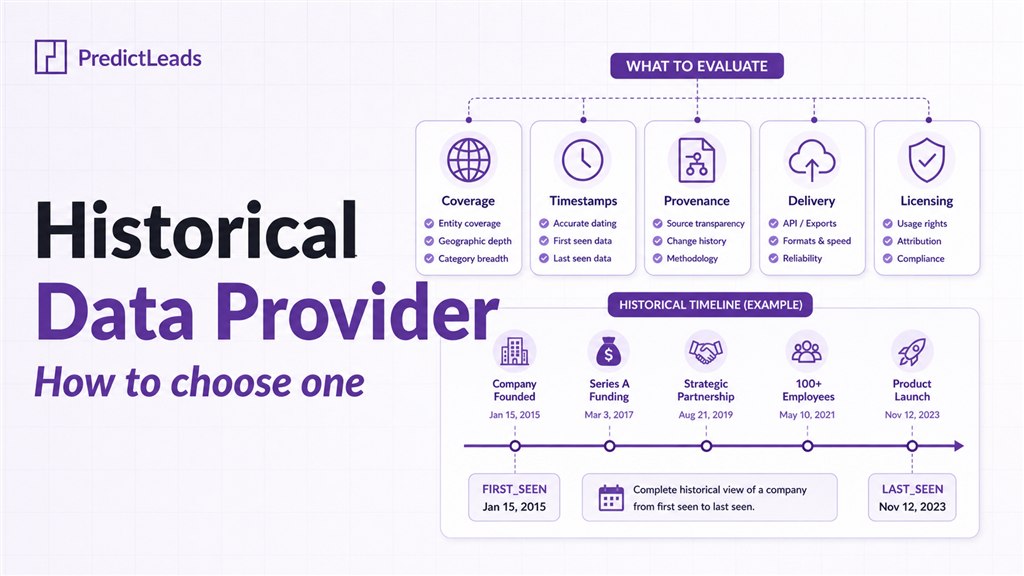
Choosing a historical data provider means checking coverage, timestamps, source evidence, delivery options, and licensing fit.
TLDR:
- Choose a historical data provider by checking coverage, timestamps, lifecycle tracking, provenance, normalization, licensing, and delivery.
- Licensing clarity and coverage reliability are the two most overlooked axes: get permitted uses in writing before you sign.
- Without
first_seen_atandlast_seen_atfields, your scoring models and backtests can confuse stale signals with current intent.- Run a pilot on 25 of your own target accounts to test timestamps, source evidence, and delivery fit before committing.
- PredictLeads offers historical company data across Job Openings, Technology Detections, News Events, Financing Events, Connections, and Website Evolution, with history going back to 2016.
What Is a Historical Data Provider?
A historical data provider collects company-level signals and keeps the time dimension attached to those signals. That time dimension matters because most GTM questions go beyond what a company looks like today. They are about what changed, when it changed, and whether that change creates a buying window.
Examples of historical company signals include:
- A company first posted several data engineering jobs.
- A new technology appeared in a company’s stack.
- A funding event, product launch, acquisition, or partnership was detected.
- A vendor, customer, partner, or investor relationship appeared.
- A website changed positioning, product pages, pricing, or messaging.
This is what turns static enrichment into intelligence your team can act on. You can use the data to score accounts, build alerts, backtest ICP rules, and route accounts when timing improves.
Why Historical Company Data Matters for GTM
Historical company data helps teams avoid one of the biggest problems in outbound and account scoring: treating every account as equally ready. A company where Snowflake was first detected last week, that opened 10 sales roles this month, or that announced a new partnership is in a different state than a company with the same profile but no recent movement.
For GTM teams, history supports:
- Timing: rank companies higher when a relevant signal appears.
- Scoring: separate stable accounts from accounts in motion.
- Personalization: reference real company changes instead of generic pain points.
- Backtesting: test which signals appeared before meetings, opportunities, or churn.
- Market research: track adoption, expansion, hiring, and competitive momentum over time.
How to Assess a Historical Data Provider
1. Check Coverage and Signal Types
Start with the signals that matter to your workflow. A GTM team may need job openings, company news, technologies, and funding. An investment team may care more about hiring velocity, financing events, market expansion, and product launches. A partnerships team may need vendor, customer, partner, and integration relationships.
PredictLeads covers multiple historical company signal types, including Job Openings, Technologies, Technology Detections, News Events, Financing Events, Website Evolution, Products, and Connections.
History starts at a different year for each dataset, so match the dataset to the lookback window your use case needs:
Dataset | History Starts | Timestamp Fields | What the Record Shows |
|---|---|---|---|
News Events | 2016 |
| Event category and the source article |
Financing Events | 2016 |
| Normalized financing type and source URLs |
Job Openings | 2018 |
| Whether a job is active or closed, plus its category |
Technology Detections | 2018 |
| When a tool was first and last detected, with source evidence |
Connections | 2019 |
| Relationship category (vendor, partner, investor) and source URL |
Website Evolution | 2021 |
| Subpage category, URL, and cleaned page text |
2. Verify Timestamp Quality
A historical data provider is only useful if the timestamps are trustworthy. Look for fields such as first_seen_at, last_seen_at, found_at, and published_at. These fields help you distinguish when something happened, when it was found, and whether it is still active. You can check which timestamp fields each dataset carries in the PredictLeads OpenAPI schema.
This is especially important for use cases like hiring momentum, technology adoption, cloud migration tracking, and company news alerts. Without reliable timestamps, teams can confuse stale signals with current intent.
3. Look for Lifecycle Tracking
Good historical datasets track the full lifecycle of a signal, beyond its existence. For example, a job opening should show whether it is active or closed. A technology detection should show when a tool was first and last seen. A news event should include the discovery date and source context.
Lifecycle tracking helps teams avoid survivorship bias. You can analyze what changed, what disappeared, and what persisted long enough to become meaningful.
4. Inspect Provenance and Source Evidence
Every important company signal should be explainable. A historical data provider should expose source URLs, categories, context, and enough evidence to help your team trust the signal. This matters for sales teams, analysts, investors, and anyone building automated scoring rules.
5. Review Normalization and Schema Quality
Raw web data creates cleanup work. Normalized categories reduce that burden. Look for structured job categories, news event categories, financing round types, relationship types, company domains, stable IDs, and consistent date fields.
For example, PredictLeads normalizes company news into event categories such as partnerships, acquisitions, funding, launches, expansions, leadership changes, and headcount changes. That makes the data easier to filter, score, and route.
6. Confirm Delivery and Licensing Fit
The best dataset is the one your team can actually use. Check whether the provider supports APIs, flat files, webhooks, or warehouse-friendly delivery. Also confirm whether your license supports internal models, CRM enrichment, alerts, analytics, and any redistribution requirements.
Delivery method decides who on your team can use the data and how quickly. Each option below has one clear advantage and one clear cost for GTM and data teams:
Delivery Method | Pro | Con |
|---|---|---|
API | Real-time access at request time. You can enrich an account the moment it enters your CRM or a Clay table, and pull its full signal history in the same call. | Needs engineering time for authentication, pagination, retries, and rate limits (PredictLeads allows 60 requests per second). Cost and effort grow with call volume. |
Flat files | Easy to load into a warehouse in bulk. A full backfill gives you years of history to join against closed-won deals for backtesting. | Arrives on a schedule, so it is less suited for real-time alerting. Bulk delivery is arranged with the provider’s sales team instead of self-serve. |
Webhooks | Pushes a notification when a new signal (a job opening, news event, or technology detection) appears for a company you follow, so reps can act while the signal is fresh. | Covers only the companies you follow and only new signals, so it does not supply history. You still need an API call or flat file backfill for the past. |
Warehouse-native delivery | Data sits next to your CRM exports and product data in Snowflake or BigQuery, so analysts join it with SQL and skip building a separate pipeline. | Depends on the provider’s loading support, adds storage and compute costs, and freshness is limited by the load schedule. |
With PredictLeads, warehouse-style delivery typically means receiving flat files (usually JSONL) through AWS S3, Google Cloud Storage, or SFTP and loading them into your warehouse. Confirm with the team whether that setup fits your pipeline before you commit.
Most teams combine methods instead of picking one. Three common pairings:
- RevOps scoring accounts: use the API to enrich new CRM records and webhooks to alert account owners when a followed account posts a relevant job or announces funding.
- Data team backtesting a scoring model: load a flat file backfill for full history, then switch to webhooks or scheduled API pulls to keep the table current.
- Product builder embedding data in an app: use the API for per-user lookups or flat files for a local copy, and check redistribution rights before you ship either.
Before you sign, ask for a sample through the exact method you plan to use. A sample that loads cleanly into your warehouse or CRM tells you more about integration effort than any feature list.
Licensing terms often decide what you can build, so get each of these rights in writing before you commit:
- Internal and non-display use: permits your team to use the data in scoring models, alerts, analytics, and research that no outside party sees. A common pitfall is assuming this covers a dashboard or report your customers can view, which many contracts treat as display use.
- CRM and enrichment use: permits you to write records into your CRM, warehouse, or enrichment workflow so reps and automations can act on them. A common pitfall is a cap on stored records or a requirement to delete enriched fields when the contract ends, which leaves your CRM with gaps.
- Redistribution rights: permit you to share records with clients, partners, or other third parties. A common pitfall is learning that redistribution is restricted only after a customer asks for a raw data export.
- Resale rights: permit you to sell the data itself, or a product built mostly from it. A common pitfall is assuming a license to embed data in your app also covers resale, when many providers treat the two as separate grants.
- AI and model training rights: permit you to train, fine-tune, or ground a model on the records. A common pitfall is signing an internal use license and then finding that training a model, or keeping its outputs after the contract ends, falls outside it.
- Data retention terms: state whether you can keep historical records and calculated fields after the contract ends. A common pitfall is building a backtesting set on history you must delete at termination, which makes your results impossible to reproduce.
If you plan to buy bulk history through flat files or historical exports, confirm these terms with the provider’s team before you build on them.
Run a Pilot Before You Sign
Turn the six checks above into a short pilot before you sign. Pull 25 of your own target accounts and test each check against real records:
- Coverage: confirm that accounts in your priority countries return job openings, news events, and technology detections, and a company profile alone does not count as coverage.
- Timestamps and lifecycle: pick a job you saw go live and later close, then check that the record shows both dates and a closed status.
- Provenance: open the source URL on five technology detections and confirm the page, script, or job description supports the signal.
- Normalization: filter news events by category (for example,
receives_financing) and check that no manual cleanup is needed before routing. - Delivery and licensing: load a sample through the method you plan to use and ask for your permitted uses in writing.
A provider that passes most checks but fails timestamps or provenance is usually the riskier choice. Without trustworthy dates and source evidence, you cannot backtest a scoring model or defend an outreach claim to a prospect.
Example GTM Workflows Using Historical Data
Hiring Momentum Scoring
Track companies that recently opened several jobs in sales, engineering, data, security, or customer success. Combine job volume, recency, role type, and location to identify companies that may be expanding, entering a new market, or investing in a specific function.
Technology Adoption Alerts
Use first-seen technology detections to identify companies with recent evidence of adopting tools such as Snowflake, BigQuery, HubSpot, Salesforce, Databricks, or cloud infrastructure. This helps sales and partner teams act while architecture and vendor decisions are still active.
Company News Triggering
Monitor news events for funding, partnerships, launches, acquisitions, office expansions, leadership changes, and headcount growth. Route relevant events to account owners or use them as inputs for lead scoring.
Customer and Partner Ecosystem Mapping
Use historical connections data to understand which companies buy from, partner with, invest in, or integrate with one another. This helps with consulting, ecosystem strategy, channel research, and competitive analysis.
Common Mistakes When Choosing Historical Data
- Choosing only by database size: coverage matters, but timestamp quality and source evidence matter more for day-to-day workflows.
- Ignoring stale data: a signal from three years ago should not score the same as a signal from this month.
- Skipping source evidence: teams need to know why a signal exists before they trust it in outreach or models.
- Using static enrichment for time-sensitive decisions: current profiles do not explain timing, momentum, or change.
Why PredictLeads for Historical Company Data?
PredictLeads is built around company signals that change over time. Teams can use PredictLeads to analyze job openings, technology adoption, news events, funding, website changes, products, and company relationships through APIs, flat files, and workflow integrations.
That makes PredictLeads useful for teams that want to build scoring models, account alerts, enrichment workflows, market maps, and AI research systems based on real company movement.
For more tactical workflows, read our guides on job openings data for sales prospecting, technographic data for sales prospecting, and using company news data for sales triggers and lead scoring.
Frequently Asked Questions
What makes historical data coverage reliable?
Reliable coverage means the provider keeps records over time for the companies, signal types, and regions you care about, with no unexplained gaps. Check the start date of each dataset, because history differs by signal. PredictLeads tracks news events and financing events since 2016, job openings and technology detections since 2018, connections since 2019, and website evolution since 2021. Then pull 20 to 30 of your own target accounts and confirm the history looks continuous, since a large database can still skip the industry or country your ICP sits in.
What is clear commercial licensing and why does it matter?
Clear commercial licensing is a written statement of what you may do with the data, for how long, and for whom. It matters because a dataset that works in a pilot can create legal risk once it feeds a customer-facing product or an AI model. A RevOps team that enriches its own CRM has different needs than a job board that shows records to end users. Get the permitted uses in the contract, not in a sales call.
What licensing rights should I check before signing with a data provider?
Check five rights: internal use (scoring, alerts, analytics), redistribution (sharing records with clients or partners), resale (selling the data or a product built from it), AI training (using records to train or fine-tune models), and retention (whether you can keep historical records after the contract ends). A data team building a lead-scoring model usually needs retention and model-training rights, while a product builder embedding data in an app needs redistribution rights. If your plan involves bulk history, such as flat files or historical exports, confirm the terms with the provider’s team before you build on them.
How do I verify timestamp accuracy in a historical dataset?
Test the timestamps against events you can verify yourself. Take 10 to 15 public events, such as a funding round, a product launch, or a job you saw go live, and compare the provider’s dates (first_seen_at, found_at, published_at) with the real date. Measure the detection lag between the event and the discovery date, and confirm last_seen_at moves forward for active records. Treat a missing detection with care, because gaps have several causes, including script changes and recrawl gaps.
What is point-in-time accuracy and why does it matter for backtesting?
Point-in-time accuracy means you can rebuild what the data showed on a past date, not what it shows today. Suppose you backtest whether a hiring spike came before closed-won deals. You must use only signals found before each deal date, otherwise future information leaks into the model and overstates its lift. Look for records that keep discovery timestamps and are not overwritten when a company changes, so each account’s history stays reconstructable.
How much historical coverage is enough?
It depends on the job. For trigger-based outreach, 12 months is often enough, because recent signals drive timing. For backtesting a scoring model, aim for history that spans at least one full sales cycle plus the closed deals you want to test against, which in many cases means two to three years. Investors tracking hiring velocity or product build-out usually want longer series, so they can compare growth across several periods.
What are the best data sources for mapping supply chain relationships between companies?
No single source covers every link, so match the source type to the question. Company disclosures such as SEC filings and published supplier lists name relationships for large public companies. Customs and bill of lading records show physical shipments between importers and exporters. Web-based Connections data reads customer, partner, vendor, and integration pages, case studies, testimonials, and logo walls. PredictLeads Connections records each relationship with a category (such as vendor, partner, or integration), a source URL, and first_seen_at and last_seen_at dates, with history since 2019. It suits software, services, and private-company ecosystems, but it does not carry shipment volumes, so pair it with trade data for physical goods.
Which data providers detect when a company opens a new office location?
Combine several signals, because no single feed catches every opening. News Events include the categories opens_new_location, expands_offices_in, expands_offices_to, and expands_facilities, each with a found_at date and a source article. Job Openings carry structured location data, so a first cluster of roles in a new city can indicate an office before an announcement. Website Evolution shows when a new location or careers subpage appears. Business-listing and foot-traffic providers cover physical places, which fits retail better than B2B offices. In many cases, news and hiring signals surface a B2B expansion first.
What are the best flat-file or bulk data providers for global company firmographic data?
There is no universally best provider, so judge each one on country-level coverage, field depth, update cadence, delivery format, and licensing. PredictLeads is the strongest fit when you want firmographics joined to hiring, technology, news, and connection history under one company ID. Its Companies dataset covers more than 130 million companies across 195 countries with 30+ attributes per record and daily updates. Bulk delivery is typically JSONL through AWS S3, Google Cloud Storage, or SFTP, arranged with the sales team. Ask any provider for record counts by country and industry, plus written terms on retention, redistribution, and resale.
What are the best data providers for tracking IPOs and public company filings?
The SEC’s EDGAR system is the free primary source for filings, and commercial providers add normalization, search, and delivery on top of it. When you compare them, check supported form types, how fast new filings appear, and whether documents come as clean text. PredictLeads SEC Filings covers forms 10-K, 10-Q, 8-K, 20-F, 40-F, 6-K, and 25, with the full document in Markdown. For the road to an IPO, add News Events (the goes_public category) and Financing Events, which record normalized types such as ipo and private rounds before it. PredictLeads is a company-signal data provider, not a market data feed, so it does not supply share prices.
Final Takeaway
A historical data provider should help your team understand company change, beyond static company attributes. Favor providers that combine broad coverage with reliable timestamps, lifecycle tracking, normalized categories, source evidence, and delivery methods your team can run in production.
When you can see what changed and when it changed, you can build better GTM timing, cleaner scoring models, stronger account research, and more relevant outreach.
Ready to see this in your own data?
Start with $20 in free credits when you create an account – no credit card, no sales call.
Pingback: B2B Data Enrichment API Sep 2026