
The best B2B data provider depends on the data you need: contact databases such as ZoomInfo, Apollo.io, Cognism, and Lusha supply verified emails and phone numbers, while PredictLeads supplies hiring, financing, and technology change signals. This comparison breaks down the top B2B data providers for 2026 by the specifics that matter: data type, freshness, delivery method, and compliance posture.
TLDR:
- B2B data providers supply raw data via API, flat files, webhooks, and Model Context Protocol (MCP), while your CRM or sales tool sits on top.
- B2B contact data decays at 22.5% per year, according to Cleanlist, so a list clean 12 months ago is already a quarter wrong.
- Match the provider to your use case first: contact data, technographic signals, intent, firmographics, or job postings.
- Check delivery format, update cadence, and compliance sourcing before database size: large counts mask poor coverage.
- PredictLeads covers hiring, financing, and technology change signals, delivered via API, flat files, webhooks, and MCP.
What Is a B2B Data Provider
A B2B data provider collects, structures, and delivers information about businesses, including company profiles, contact records, technology usage, hiring signals, and news events, to sales, marketing, investment, and product teams. Instead of building a research team to track every account you care about, you buy access to a dataset that someone else has already crawled, cleaned, and organized. The provider handles the collection and structuring; you handle the decision about what to do with it.
Here is a concrete use case: a sales team that sells security software wants to reach companies that may be building out their security function. The team pulls Job Openings for security engineer roles from a data provider, filters them by company size and location, and adds recent Financing Events to spot accounts with fresh budget. Then the team routes the matching accounts to reps with a stated reason to reach out. The provider supplied the hiring and funding records, and the team decided who to contact and what to say.
Data Providers vs. the Tools You Use
A data provider supplies the underlying information layer, not the interface you act on it through. A CRM, a sales engagement tool, or an outreach sequencer is where you use the data. The provider is where the data originates. Some companies blend the two by bundling raw data with a prospecting UI, but the function of a data provider is supply, not the tool built on top of it.
Data Consumers vs. Data Builders
Buyers tend to fall into one of two modes, and which one you are shapes which provider actually fits your needs.
- Data consumers read information through a tool they already use, such as a CRM field, a Clay enrichment column, or a dashboard built by someone else on the team. They care about accuracy, coverage, and whether the data shows up where they already work.
- Data builders integrate raw records through an API, flat files, webhooks, or MCP, usually to feed a scoring model, an internal tool, or a pipeline other systems depend on. They care about schema, freshness, and delivery format as much as the underlying facts.
Consumer example: A sales rep at a mid-market SaaS company filters leads by technographic fit directly inside HubSpot, such as accounts showing evidence of using a competitor’s tool. The rep wants clean fields in the CRM they already use and never touches an API.
Builder example: A RevOps team pipes Job Openings and firmographic signals through an API into an internal lead-scoring model. The team cares about documented endpoints, consistent schema, and refresh cadence, because the model breaks if any of them change.
Most provider comparisons treat these two buyers as interchangeable, which is why a tool that looks perfect in a demo can feel wrong once your team uses it. Before comparing vendors by name, decide which mode your team is in.
Types of B2B Data Explained
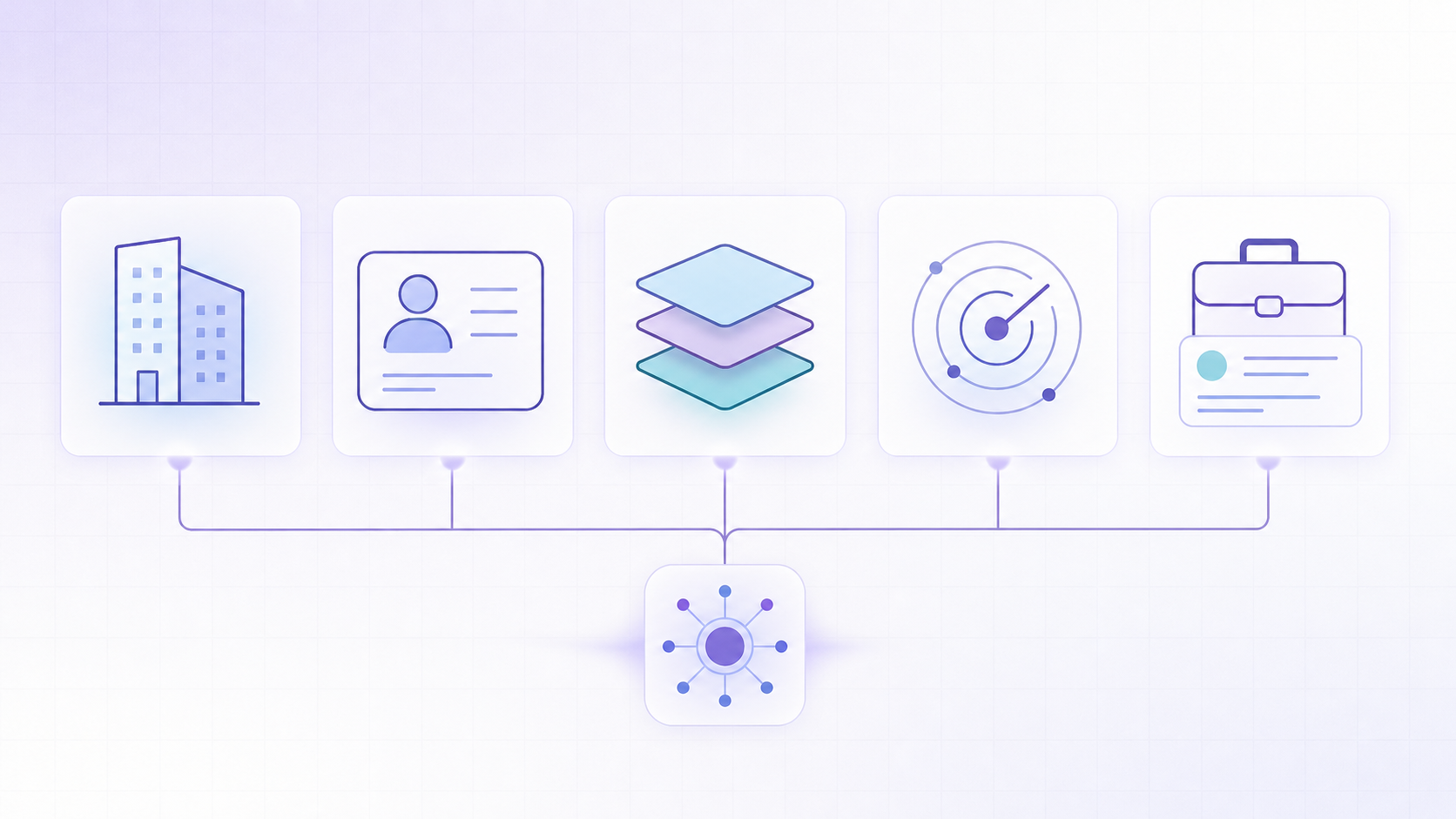
B2B data breaks down into five categories, and most providers specialize in one or two instead of covering all five well. Knowing which categories matter for your use case is the fastest way to cut a long list of vendors down to a handful worth trialing.
Firmographic Data
Firmographic data describes the company itself: name, headcount, industry classification, revenue range, location, and often a NAICS code. This is the layer almost every other dataset attaches to, since you need to know what a company is before you can filter or segment it. A CRM’s company fields, a market sizing exercise, or a due diligence memo all start here.
Contact Data
Contact data covers the people inside a company: names, titles, emails, and phone numbers. This is the layer most associated with the term “B2B database,” and the one that decays fastest, since people change jobs, titles shift, and emails go stale within months of being collected. Providers in this space compete mainly on match rate and how often records get refreshed.
Technographic Data
Technographic data provides evidence of which software and tools a company uses or has recently used, detected through website script tags, DNS records, job descriptions that list required skills, and other public signals. Sales teams use it to find accounts showing evidence of using a competitor’s tool or a complementary product, and marketing teams can use technology data to improve targeting. The detection method matters here: providers relying only on visible website tags miss tools that sit behind a login, while those pulling from job postings and DNS records tend to catch more of the stack.
Intent Data
Intent data tracks behavioral signals suggesting a company may be researching a purchase, often built from content consumption patterns across a network of publisher sites. It answers a different question than the other four categories: not who a company is or what it uses, but whether it appears to be in-market right now.
Job Posting Data
Job posting data covers active job openings, which reveal hiring priorities, growth areas, and where a company is putting budget. A company hiring for a security engineer signals a different buying window than one hiring for outbound sales reps, and the categories and seniority levels attached to each posting make that distinction easy to filter for.
Top providers rarely stop at one category. A firmographic-only provider tells you what a company is but nothing about what it is doing right now, and a contact-only provider hands you names with no context for why to reach out. Vendors worth shortlisting tend to combine at least two or three of these categories, so rank which ones matter most for your workflow before comparing vendors by name.
Top B2B Data Providers for 2026
The B2B data provider market splits into four categories, and no single vendor covers all of them well: contact databases (verified emails and phone numbers), intent data (buying signals like content consumption), technographic and signal providers (hiring, funding, and technology changes), and firmographic enrichment (company details for account research). Start with the problem you are solving. Coverage figures in the table are vendor-reported, so read them as scale indicators, not like-for-like counts.
Provider Comparison Table
Provider | Category | Known For | Delivery |
|---|---|---|---|
ZoomInfo | Contact database | Large contact volume for enterprise sales teams (vendor-reported 500M+ contacts, 100M+ companies) | API, exports |
Apollo.io | Contact database and outreach | Combined prospecting and sequencing in one tool (reported 275M+ contacts, 73M+ companies) | API, browser extension |
Cognism | Contact database | Compliance-focused coverage for EMEA-heavy sales motions (200M+ European contacts) | API, exports |
Lusha | Contact database | Chrome extension prospecting for individual reps (515M+ contacts, 29M+ companies) | Browser extension, API |
Clearbit (Breeze Intelligence) | Firmographic enrichment | Form and CRM enrichment inside HubSpot | API |
PredictLeads | Technographic and signal data | Hiring, financing, and technology change tracking across 132M+ companies, with technographics sourced from script tags, DNS records, and job descriptions | API, flat files, webhooks, MCP |
Pros and Cons by Provider Category
Contact database providers
- Pros: direct emails and phone numbers, quick setup inside a CRM or browser extension, broad people coverage.
- Cons: records go stale fast, little context on why to reach out now, seat-based pricing can limit team growth.
Intent data providers
- Pros: flag accounts that may be in-market, help rank an existing list, pair well with firmographic filters.
- Cons: signals are inferred from behavior, so accuracy varies; underlying sources can be opaque; smaller companies are often thinly covered.
Technographic and signal providers
- Pros: timestamped, source-linked signals on hiring, financing, and technology changes; show what a company is doing now; flexible delivery for builders.
- Cons: little or no direct contact data, so you pair them with a contact provider; detection gaps have several causes, such as script changes or recrawl timing; signals need a workflow to become outreach.
Firmographic enrichment providers
- Pros: clean company fields that anchor CRM records, simple API lookups, solid for segmentation and routing.
- Cons: a static profile says little about current activity, depth varies outside major markets, per-record pricing adds up at volume.
How to Choose a B2B Data Provider
Picking a provider off a ranking list skips the part that actually matters: whether that provider fits how your team works. A few criteria apply regardless of category, and running any shortlist through them tells you more than a star rating ever will.
Criteria to Check in Every Provider
- Data quality and accuracy. Ask how a provider verifies records, beyond the raw count it claims to have. Some run automated matching against public sources, others rely on manual review, and a few just recrawl on a schedule and hope nothing changed. Decay rates matter here too: contact data goes stale fast, so a provider with no refresh cadence is selling you a shrinking asset from day one.
- Coverage and depth. A provider might claim tens of millions of companies, but if most of them sit in one country or one size bracket, that number tells you nothing about whether it covers your accounts. Check geographic reach, company size distribution, and industry concentration against your actual target list before comparing totals.
- Data freshness. Look for update cadences stated in days or weeks, not vague promises of continuous refresh. Timestamp fields on individual records let you filter by recency instead of trusting the vendor’s word for it, and historical data availability matters if you ever need to build trendlines instead of single snapshots.
- Compliance posture. GDPR and CCPA compliance should be a baseline requirement, not a selling point. SOC 2 certification signals a provider takes data security seriously beyond just legal compliance. If a vendor cannot explain where its data comes from, take that as a warning sign.
- Integration options. Match delivery to how your team actually works: a CRM connector if you live inside Salesforce or HubSpot, a documented API and webhooks if you are piping data into your own systems, flat file delivery if you are loading into a warehouse. A great dataset with no path into your workflow just sits unused.
- Pricing model. Seat-based pricing punishes teams that want to add users without adding budget. Credit-based and pay-as-you-go models scale with actual usage but require you to know your query volume ahead of time. Neither is inherently better, but mismatched pricing models are one of the more common reasons teams outgrow a vendor within a year.
- Free trial or sample data. A provider unwilling to let you test against a handful of your own target accounts before you commit is asking you to buy blind.
Why Database Size Misleads Buyers
Database size alone is a weak proxy for quality, and the market’s own growth proves it. According to a 2026 B2B data industry report, the market for B2B sales data is on track to reach roughly $15 billion by 2030, about 17 times its size in 2005, yet that growth in raw access has not translated into a matching gain in pipeline for most teams. The challenge has shifted from getting hold of contact data to using it before it goes stale, which is exactly why the criteria above matter more than the number printed on a provider’s homepage.
Data Quality, Freshness, and the Cost of Bad Data
Data quality is not a feature you can trade off against price. It is the difference between a dataset that makes your team faster and one that quietly wastes their week.
How Fast B2B Data Decays
Decay arrives month by month, not in one annual hit. At 2.1 percent per month, according to Cleanlist’s research on b2b data decay rates, each month’s losses stack on top of the last. Roughly one in four records in your CRM turns inaccurate every year without active maintenance, not because anyone did anything wrong, but because people change jobs, companies get acquired, and phone numbers get reassigned. Left unchecked, that decay compounds. A list that was clean 12 months ago is now a quarter wrong, and next year it will be worse.
The cost of that decay is not abstract. Poor data quality leads to wasted marketing spend, lost sales opportunities, and other inefficiencies. Translate that down to a single rep’s week and the pattern is familiar: emails that bounce, calls that reach a number reassigned to someone else, outreach sequences aimed at a company that already got acquired or quietly shut down six months ago. None of that shows up as a line item on an invoice, but it shows up in pipeline that never materializes and reps who stop trusting the tool.
A dataset that cannot tell you when a record was last verified is asking you to trust it blindly.
How to Spot Fresh, Traceable Data
Good data hygiene is visible if you know where to look. A provider should be able to explain its verification method, and go further than reciting a company count. Source transparency matters here: knowing which URL, job posting, or DNS record produced a given detection lets you judge how reliable that signal actually is, instead of taking a black box match on faith.
A few checks separate providers who take freshness seriously from those who paper over it:
- Update frequency stated per dataset. A company profile and a job posting do not decay at the same rate, and neither should be refreshed on the same schedule. A provider that lumps everything into one vague “regularly updated” claim is hiding the detail you need.
- Timestamp fields exposed at the record level. Fields like
first_seen_atandlast_seen_atlet you filter for recency yourself instead of trusting a vendor’s claim of continuous refresh. - Source-level provenance. Knowing whether a signal came from a job board, a press release, or a DNS record change tells you how much weight to put on it before you build a workflow around it.
A provider that exposes those timestamps is handing you the tools to judge freshness on your own terms, not asking you to take its word for it. Teams building pipelines may also want to review how a technographic data API for B2B enrichment handles timestamp fields before committing.
Compliance Requirements for B2B Data
Assuming B2B data sits outside privacy law is no longer a defensible position. GDPR set the standard in 2018, and since then, CCPA and CPRA have expanded coverage in California, with 20 US states now carrying broad privacy laws on the books, according to Unify’s guide to b2b data compliance requirements. A contact record tied to a named person at a company counts as personal data under most of these frameworks, regardless of whether that person is acting in a business capacity.
Penalties and Inherited Risk
The penalties are not theoretical. According to DLA Piper’s January 2026 GDPR fines survey, GDPR fines reached a cumulative total of 7.1 billion euros between May 2018 and January 10, 2026, and regulators have acted on complaints about purchased contact data, B2B lists included. A vendor selling you a list does not absorb that risk. You inherit it when you load those records into your CRM and start emailing or calling people on it.
What to Check Before You Sign
A few things are worth checking before you sign a contract, not after:
- Lawful basis. Ask for documentation, not a checkbox on a sales page: the legal basis for processing contact data (commonly legitimate interest under GDPR, backed by a documented assessment), a data processing agreement, and the source of each record. A provider that cannot describe its legal basis should not hold your list.
- Public-only sourcing. Collection from company websites, job postings, and public filings carries a cleaner compliance story than scraped or purchased lists of unknown origin.
- Opt-out and suppression. A compliant provider honors deletion and opt-out requests (including CCPA opt-outs of sale or sharing) and pushes them to you through updates or a suppression list. If removals never reach data you already downloaded, you are still holding records you should not have.
- Security certifications. SOC 2 Type II and ISO 27001 show that data handling is audited, not an internal promise. SOC 2 covers how a vendor secures data, while GDPR and CCPA cover the legal basis for collecting it, so a provider with both carries lower vendor risk than one with either alone.
Buying a contact list does not transfer the compliance burden away from you. It hands you the provider’s obligations without the paperwork showing how the data was collected. Vetting sourcing methodology is the difference between a defensible outreach program and one a single complaint can unravel.
Common Mistakes When Buying B2B Data
Buying a B2B dataset is easy. Buying the right one is where most teams trip up, usually in ways that only show up after the contract is signed.
- Chasing database size over relevant coverage. A vendor advertising 200 million contacts sounds better than one advertising 50 million, but if your accounts sit in mid-market manufacturing and much of that larger database skews toward enterprise tech accounts, the bigger number is worth little to you. Check coverage against your actual target list, not the vendor’s total. Technographic segmentation is one method for building those target account lists more precisely.
- Ignoring delivery format until after signing. A team that lives in Salesforce finds out too late that a provider only ships flat files on a weekly cadence, or a data engineer finds the API has no webhook support for real-time triggers. Confirm the delivery method, whether that is API, flat files, webhooks, or MCP, fits your stack before you commit, not after the invoice arrives.
- Underestimating credit costs. Credit-based pricing looks cheap in a demo, right up until a team runs its actual monthly query volume through the math and finds the bill triples. Before signing, estimate how many records you will pull in a typical month and run that number against the vendor’s per-credit pricing, not the number the sales rep quoted for a light trial.
- Skipping compliance checks. A dataset priced well below the market rate is often built on scraped or purchased lists with no clear consent trail, and that risk transfers to you the moment you load it into your CRM. Ask about sourcing methodology before you ask about price.
- Never requesting a sample. Committing to an annual contract without testing a provider against a handful of your own target accounts leaves you with no basis for judging accuracy until the invoice is already paid. A vendor unwilling to hand over sample data for your own accounts is telling you something worth hearing before you sign, not after. For a deeper look at vetting vendors, see how to vet a technographic data provider for B2B sales and enrichment.
The pattern across all five mistakes is the same: they surface after the contract, not during the demo. A demo shows you the best version of a product, built on whatever accounts make the vendor look good. Your own accounts, your own query volume, and your own compliance requirements decide whether a provider works for you, and none of those three things show up on a sales call unless you ask.
How B2B Data Is Delivered
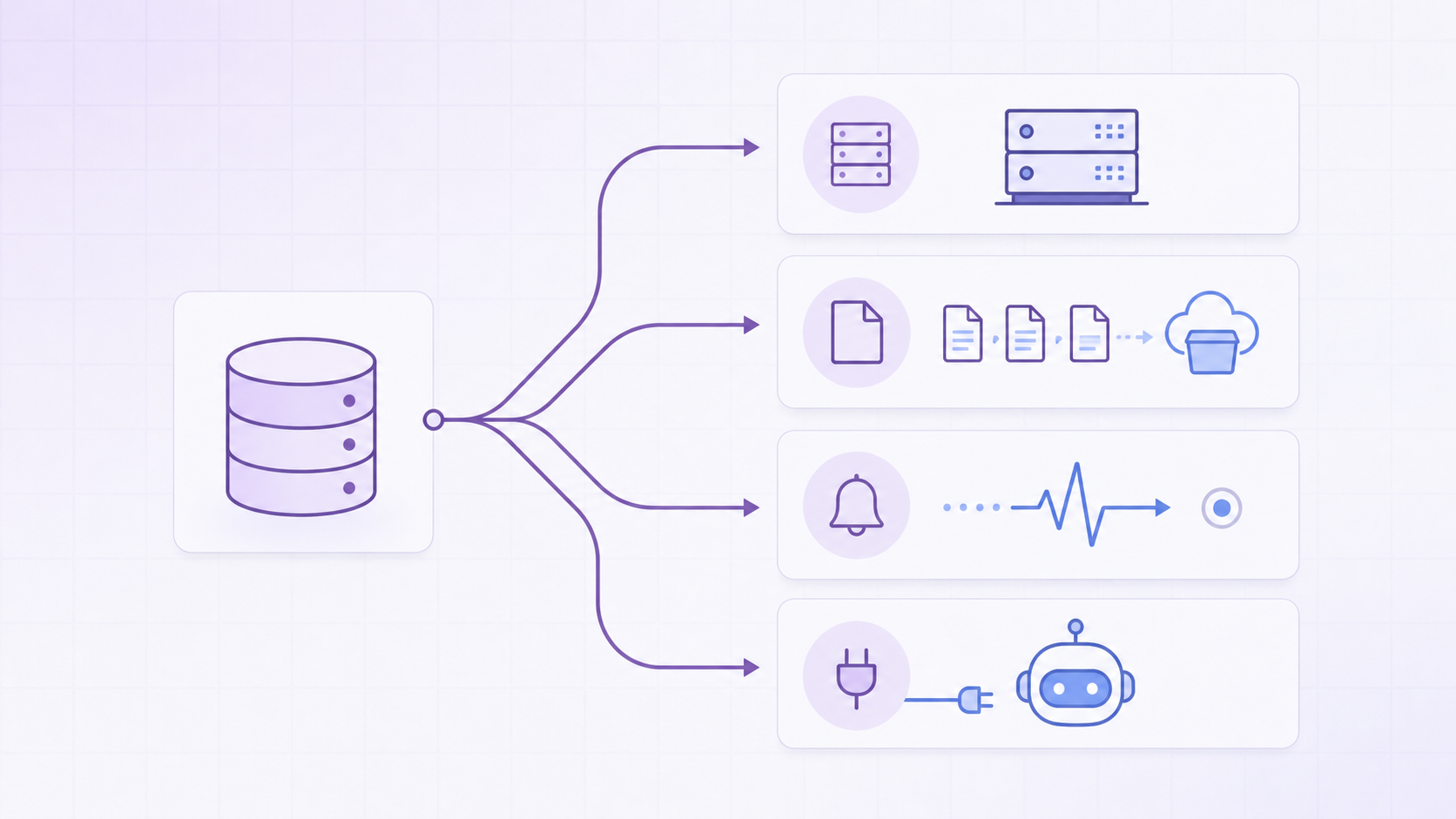
Delivery method decides whether a dataset fits your stack, and providers vary widely in which methods they support. Four formats cover most of the market, and knowing which one matches your setup narrows a vendor shortlist fast.
REST API, Flat Files, Webhooks, and MCP
- REST API. Built for real-time lookups and enrichment at the moment you need it, whether that is a CRM field populating on page load or an application pulling a company record mid-workflow. This is the default method most data consumers reach for, since it plugs into an existing tool without any pipeline work on your end.
- Flat files. Bulk delivery, typically JSONL or CSV, dropped into cloud storage on a set schedule. This is the method for warehouse ingestion into Snowflake or BigQuery, historical backfills, or any analysis that needs the full dataset instead of one record at a time. Data builders lean on this when a live API call is overkill for what they are doing.
- Webhooks. Push notifications that fire the moment a new signal appears for a company you are tracking, without requiring you to poll an endpoint to check. This is the format for real-time trigger workflows: alerting a rep the moment a target account posts a new job opening, or feeding an automation the instant a company news event gets detected.
- MCP. Model Context Protocol (MCP) is a newer standard that lets AI agents query a dataset conversationally, treating it as a callable tool instead of a fixed endpoint you have to code against ahead of time. It fits agent workflows where the query itself gets generated on the fly instead of written in advance.
Which Providers Support Which Formats
Not every provider supports all four, and that gap is worth checking before you sign anything. A contact database provider built around a browser extension may only offer an API and skip flat files and webhooks entirely, since its buyers are mostly reps working one record at a time. A provider built for pipeline work usually covers API, flat files, and webhooks, since data builders need all three depending on the job.
Matching the method to the buyer matters more than matching it to the dataset. A data consumer generally wants a CRM connector or a simple API call, since the goal is getting clean fields into a tool that already exists. A data builder wants API access for live lookups, flat files for bulk loads, and webhooks for anything that needs to trigger downstream, often combining all three inside a single pipeline. Teams assessing niche providers for this use case may also want to review TheirStack alternatives for technographic and job data. Ask a vendor which of the four they support natively versus which require a workaround, since a method listed on a pricing page is not always the one that ships without a support ticket.
Frequently Asked Questions
What is a B2B data provider? A B2B data provider is a company that collects, structures, and delivers information about businesses, such as company profiles, contact records, technographic data, job signals, and news events, to sales, marketing, investment, and product teams. It supplies the underlying dataset, not the tool you view it through.
What is the difference between a B2B data provider and a sales intelligence tool? A data provider supplies structured data through an API, flat files, or webhooks. A sales intelligence tool is an end-user application that displays that data in a UI, such as a filterable list or a CRM sidebar. Many sales intelligence tools are built on top of one or more data providers and do not collect the data themselves.
Are there free B2B data providers? Several providers offer free tiers or trial credits with limited record counts, including Apollo.io and PredictLeads, where new accounts receive $20 in free credits (500 credits at the $0.04 starting rate). This is a one-time allocation that does not renew monthly. A free tier lets you test accuracy and fit against your own accounts before committing, but production use across a full account list generally requires a paid plan.
How do B2B data providers collect their data? Collection methods vary by category:
- Crawling public company websites, career pages, and news sources for company and hiring data.
- Using a technology detection API to identify script tags and DNS records and map the technologies a company shows evidence of using.
- Parsing job descriptions for required skills and hiring signals.
- Using logo recognition and optical character recognition to map business connections from case studies and partner pages.
- Pulling structured feeds from public filings and startup platforms.
Reputable providers document their collection methods and limit sourcing to publicly available information, not scraped or purchased lists of unknown origin.
PredictLeads: Company Intelligence Data Across the Full Signal Stack
PredictLeads is a company intelligence data provider that tracks 132M+ companies across 195 countries, pulling structured signals from hiring activity, technology adoptions, news events, financing rounds, and business connections into a single API. Where contact database providers stop at names and emails, PredictLeads covers the layer beneath: what a company is doing right now, beyond who works there. The Job Openings dataset spans 3M+ companies and 284.4M+ historical records with O*NET codes, salary data, and seniority levels, so you can filter for the specific hiring signal that maps to your ICP instead of sifting through raw postings. Technology Detections cover 250K+ technologies across 98M+ websites, sourced from script tags, DNS records, cookies, and job descriptions, which means tools sitting behind a login show up in the results. The News Events dataset categorizes signals from 20M+ sources into 37 event types, including receives_financing, increases_headcount_by, launches, and signs_new_client, each with a confidence score and a link back to the original source so you can judge the signal before you act on it. Data is delivered via API, flat files, webhooks, and Model Context Protocol (MCP), and every record exposes first_seen_at and last_seen_at timestamps so you can filter by recency instead of taking a vendor’s refresh claim on faith.
FAQ
Which B2B data provider should I use if I need technographic and hiring signals beyond contact records?
If your use case is competitor displacement, integration targeting, or trigger-based outreach, you need a b2b intent data and signal provider, not a contact database. PredictLeads covers technographics across 98M+ websites, job openings from 3M+ companies, and 37 categories of structured news events, all with source-level provenance so you can judge signal quality instead of taking a black-box match on faith.
How do I choose between API, flat files, and webhooks when integrating a B2B contact database provider?
Use the API for real-time enrichment at the moment a record is needed, flat files for bulk warehouse ingestion into Snowflake or BigQuery, and webhooks when you need a push notification the instant a signal fires, such as a target account posting a new job opening or closing a financing round. Most data builders end up combining all three inside a single pipeline depending on the job, so confirm a provider supports all three natively before signing.
What should I check before buying from any B2B database provider?
Test the provider against your own target accounts before committing, not the demo accounts the vendor chose. Ask for timestamp fields like first_seen_at and last_seen_at on individual records, request documentation on sourcing methodology, and run your actual monthly query volume through the per-credit pricing math. A provider that cannot explain where a detection came from or how frequently a given dataset refreshes is asking you to trust a claim it cannot back up.
Why does B2B data decay matter more than total database size when comparing top data providers?
B2B data decays at roughly 22.5 percent annually, which means one in four records in a static list turns inaccurate within a year. A top b2b data provider with 200 million records and no stated refresh cadence delivers less usable coverage than a smaller provider with daily crawl cycles and exposed freshness timestamps. Database size is a marketing number; update frequency and source transparency are what determine whether the data your team acts on is still accurate when they act on it.
What is a good way to enrich a CRM with firmographic and technographic data via API?
Key the enrichment on the company domain. Store the domain on every account, call a company endpoint for firmographics (location, NAICS codes, revenue range, headcount), call a technology detections endpoint for evidence of the tools each company uses, and write the results to custom CRM fields. Pull firmographics once and refresh technographics on a schedule, since technology usage changes. Keep first_seen_at and last_seen_at alongside each detection so reps can judge recency. If you do not want to write code, PredictLeads connects to Clay, Make, and n8n, and webhooks can push changes for followed companies instead of polling.
What are the best data sources for account-based marketing (ABM) signals?
Most ABM programs combine several layers. Use firmographic data to select accounts, Technology Detections to confirm fit, and Job Openings, News Events, and Financing Events to time outreach. Add Connections to find partner and customer paths into an account, and first-party signals from your CRM, website engagement, and product usage to measure interest. Third-party intent data from content consumption networks adds an in-market estimate and pairs well with public signals. PredictLeads supplies the public signal layers (hiring, technology, news, financing, connections) and does not provide content-consumption intent.
What are the best data sources for identifying newly funded startups to prospect?
Combine structured funding feeds with primary sources. The PredictLeads Financing Events dataset holds 216,700+ funding events since 2016, each with a normalized financing type (such as seed or series_a), a normalized amount in USD, investors, and source URLs, and you can filter by financing type and company location. Cross-check with SEC Form D filings, accelerator cohort announcements, and press releases, and use Startup Platform Posts (Product Hunt, Hacker News) to spot young companies before a round is announced. Funding is often reported after it closes, so compare effective_date with found_at before you treat a round as fresh.
What are the best data providers for identifying similar or lookalike companies?
Look for a provider that returns a similarity score and a reason for each match, along with the list of names. The PredictLeads Similar Companies dataset covers 18.9M+ companies, returns up to 50 lookalikes per company with a score from 0 to 1, and includes a text reason for the top 20 matches. Matching draws on technologies, news, jobs, and other datasets, so you can feed in your best customers and get accounts with a stated reason each one fits. Contact-first providers can then supply the people records for those accounts.
What are the best data providers for tracking IPOs and public company filings?
SEC EDGAR is the primary source for filings, and providers add structure, search, and links to company records. The PredictLeads SEC Filings dataset returns form types 6-K, 8-K, 10-K, 10-Q, 20-F, 40-F, and 25 with the full document in Markdown, and you can filter by form type and filing date. To catch the IPO itself, pair it with the goes_public category in News Events and the ipo financing type in Financing Events. Check each provider’s form coverage and update cadence against the filings you need before you commit.
Ready to see this in your own data?
Start with $20 in free credits when you create an account – no credit card, no sales call.
Pingback: Owler Alternatives for 2026 | PredictLeads
Pingback: Why B2B Data Should Be Easier to Compare | 2026